
I Gave AI a UVM Spec: It Caught 4 of 4 Bugs. Our Hand-Written Bench Caught 2
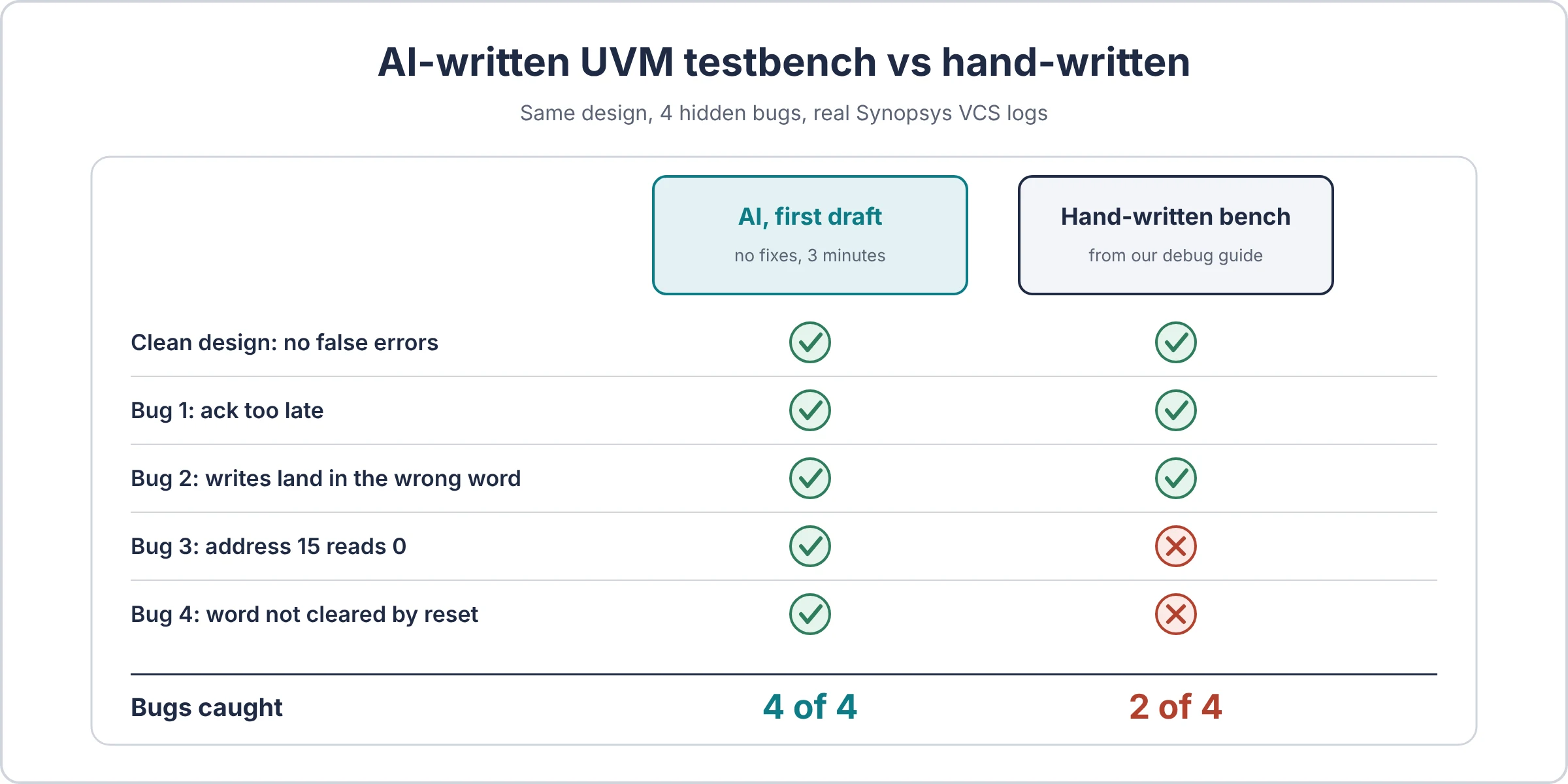
In short: We gave an AI a one-page spec for a small memory and asked for a full UVM testbench. Its first draft, unchanged, compiled on Synopsys VCS, passed the clean design with 0 errors, and caught all 4 bugs we had hidden in the design. Our own hand-written bench from the debug guide caught 2. The AI was not smarter at checking. It was more thorough at stimulus: it read every word before writing it and covered all 16 addresses. That is a habit you can copy today.
Every AI demo shows code that compiles. Compiling is the easy part. The question a verification engineer cares about is different: does the testbench find bugs, or does it just print PASS?
So we tested exactly that, with real runs, real logs, and every file you need to repeat it.
| AI testbench, first draft | Our hand-written bench | |
|---|---|---|
| Clean design | 0 errors | 0 errors |
| Bug 1: ack too late | Caught | Caught |
| Bug 2: writes land in the wrong word | Caught | Caught |
| Bug 3: address 15 always reads 0 | Caught | Missed |
| Bug 4: one word not cleared by reset | Caught | Missed |
| Transfers per run | 640 | 16 |
| Fix rounds needed | 0 | n/a |
All runs: Synopsys VCS X-2025.06-SP1, UVM 1.2, November 2026.
The whole experiment in one analogy
Think of it as a driving test with hidden cones. The examiner places the cones before the learner arrives; the learner only gets the highway code. Passing means two things: no crashes on an empty road, and stopping for every cone.
| Driving test | This experiment | Why it matters |
|---|---|---|
| The highway code | The one-page spec | The learner can only follow rules that are written down |
| The learner driver | The fresh AI agent | Knows the rules, has never seen this road |
| Hidden cones | The 4 planted bugs | Placed before the test, never announced |
| Driving on an empty road | The clean design run | A good driver does not brake for nothing (no false errors) |
| Stopping for every cone | Catching every bug | The real score |
| Which streets the route covers | The stimulus | You cannot stop for a cone on a street you never drive |
| Good eyesight | The checker (scoreboard, assertions) | Useless on streets you never visit |
| The examiner | VCS plus a human reading the logs | Someone still has to decide what counts |
Keep the last two rows in mind. They explain the whole result.
The setup: one spec, one prompt, four hidden bugs
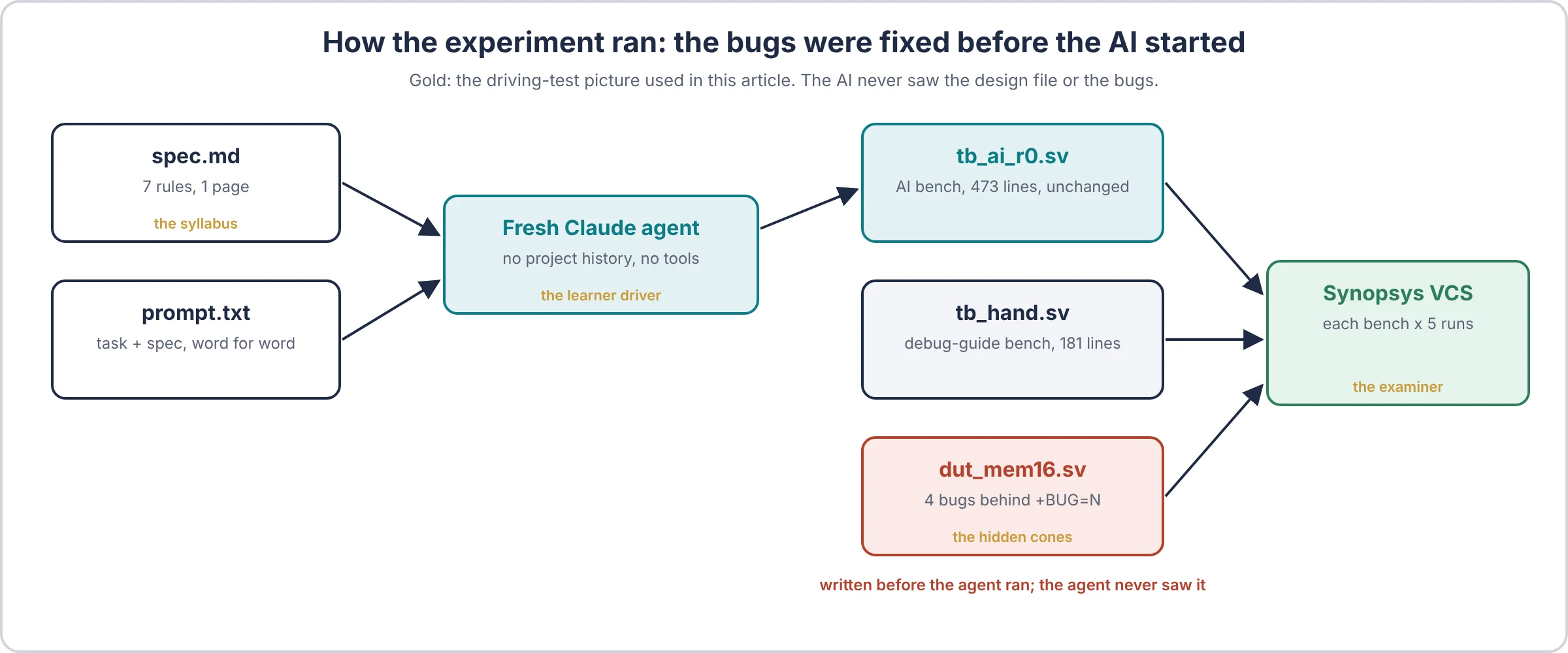
Here is the route of the driving test from the analogy above: who got what, and who never saw the cones.
The design
mem16 is a 16-word by 32-bit memory with a req/ack handshake, the same style of design as the bench in our debug guide. Its whole spec fits on a page:
- Reset clears all 16 words,
ackandrdatato 0. - The requester holds
req,we,addrandwdatauntil it seesack. ackis high for exactly one cycle, 1 to 5 cycles after the first edge that seesreq. The delay may vary.- A write stores
wdataataddrwhenackrises. - A read returns the last value written to
addrsince reset, or 0, in theackcycle. - The requester drops
reqfor at least one cycle between transfers. - All 16 addresses are valid.
The prompt, word for word
The agent also got one extra first line, “Do not use any tools. Answer from your own knowledge only, in a single reply”, so it could not look anything up or run a simulator.
You are a senior design verification engineer. Write a complete UVM 1.2 testbench in SystemVerilog for the design described in the specification below.

Requirements:
- The design is a module named mem16 with exactly the ports in the specification. It is compiled from a separate file. Do not write or modify the design.
- Put the whole testbench in one file. The top module must be named tb_top and must instantiate mem16, generate the clock and reset, and call run_test().
- Use a UVM test named mem16_test so that run_test("mem16_test") works without command-line arguments.
- The testbench must check the design against the specification and report any mismatch with `uvm_error. A correct design must finish with 0 UVM_ERROR and 0 UVM_FATAL.
- The test must end on its own, within 1 ms of simulated time.
- It must compile and run on Synopsys VCS with the built-in UVM 1.2 library (vcs -sverilog -ntb_opts uvm-1.2).

Reply with only the testbench file, in a single code block, followed by at most 5 short bullet points describing what the testbench checks.

Specification:
(the full spec, as in spec.md below)
The four hidden bugs
Each bug was written into the design before the AI ran and switched on with +BUG=N. The prompt never mentions them. Each one needs a different testing habit to find:
| Bug | What is wrong | The habit that finds it |
|---|---|---|
| 1 | Every 5th transfer acks after 6 cycles | A timing check on rule 3 |
| 2 | Writes to addresses 8 to 15 land in the neighbouring word | Write and read back across all addresses |
| 3 | A read of address 15 always returns 0 | Visit the top address with non-zero data |
| 4 | After reset, word 5 holds DEADBEEF | Read a word before writing it (rule 5: “or 0”) |
The rules
- The AI: a fresh Claude agent that saw only the prompt and the spec. No project history, no design file, no hints. Its output is published unchanged.
- Help allowed: the first draft is scored as is. Up to 3 fix rounds were allowed, feeding back only compiler or simulator messages. None were needed.
- The baseline: the bench already published in our debug guide, written before these bugs existed. We removed only its built-in design and its own bug switches.
- A bug counts as caught if the run ends with at least one UVM_ERROR that points at it.
What the AI wrote
The agent replied in about 3 minutes with one file: 473 lines, a full UVM structure (interface with two clocking blocks, item, sequences, driver, monitor, scoreboard, agent, env, test) and five bullets describing its checks. Below are the four parts that mattered most, copied unchanged.
Its structure is the textbook one, the same layout we draw in UVM testbench architecture: a driver pulling items with get_next_item() (sequencer and driver communication), a monitor feeding the scoreboard through an analysis port (UVM TLM explained), and a virtual interface passed through uvm_config_db (why a virtual interface). Nothing exotic. The difference was in what it chose to test.
1. Read every word before writing anything
This is the line most hand-written benches skip, and the only way to catch bug 4.
task body();
  bit [31:0] pat;
  // 1. all addresses read 0 after reset
  for (int i = 0; i < 16; i++) rd(i, 0);
  // 2. fill with patterns, read back
  for (int i = 0; i < 16; i++) begin
    case (i)
      0:       pat = 32'hFFFF_FFFF;
      1:       pat = 32'hA5A5_A5A5;
      2:       pat = 32'h5A5A_5A5A;
      3:       pat = 32'h0000_0001;
      4:       pat = 32'h8000_0000;
      default: pat = $urandom;
    endcase
    wr(i, pat, 0);
  end
  for (int i = 0; i < 16; i++) rd(i, 0);
It then overwrites all 16 words and reads them back in reverse order, does 64 write-then-read pairs, and finishes with 300 random transfers.
2. A timing check that fires on time
The monitor counts cycles after req and reports the moment the 5-cycle window closes, not when (or if) ack finally arrives:
if (cnt == 5 && !late) begin
  `uvm_error("ACK_LAT", $sformatf("no ack within 5 cycles for %s addr=%0d",
             cur.we ? "WR" : "RD", cur.addr))
  late = 1'b1;
end
It also checks that ack lasts exactly one cycle and never appears with no transfer pending.
The hand-written bench checks the same rule with a concurrent SVA assertion, $rose(req) |-> ##[1:5] ack. Both styles caught bug 1. A monitor check is easier to print context from; an assertion is shorter and also works in formal tools. More in immediate vs concurrent assertions and SVA assertions with examples.
3. A second reset, nobody asked for it
After the main sequence, the test resets the design mid-run, checks ack and rdata are 0 straight away, then reads all 16 words again. That is why bug 4 was caught twice.
It drives the reset from the test itself and holds one objection across both sequences, so the test still ends on its own (how a UVM test ends with objections). For a cleaner way to repeat reset inside UVM, see reset testing with phase jumps.
4. Proof of what it exercised
The scoreboard keeps a histogram of ack delays and prints it at the end:
[SB] ack latency histogram 1..5: 160 160 160 160 0That one line tells you every delay from 1 to 4 was seen 160 times, and delay 5 was never seen. Without it, nobody would know the slowest legal case was never tested.
The runs: real logs
Each bench ran 5 times on the same design: clean, then each bug alone. The design prints one line first, so you can see each setting really arrived.
The AI bench
mem16: hidden bug = 0
[SB] writes=272 reads=368 resets=2 read_mismatches=0
[SB] ack latency histogram 1..5: 160 160 160 160 0
UVM_ERROR :    0

mem16: hidden bug = 1
UVM_ERROR testbench.sv(262) @ 305000: uvm_test_top.env.agt.mon [ACK_LAT] no ack within 5 cycles for RD addr=4
... 127 in total, one for every 5th transfer

mem16: hidden bug = 2
UVM_ERROR testbench.sv(328) @ 1885000: uvm_test_top.env.sb [SB] Read mismatch addr=8: got 0xa2014b2d expected 0xe2afe5a8
UVM_ERROR testbench.sv(328) @ 1925000: uvm_test_top.env.sb [SB] Read mismatch addr=9: got 0xe2afe5a8 expected 0xa2014b2d
... 158 in total, all at addresses 8 to 15

mem16: hidden bug = 3
UVM_ERROR testbench.sv(328) @ 2215000: uvm_test_top.env.sb [SB] Read mismatch addr=15: got 0x00000000 expected 0x6bd7350b
... 18 in total, all at address 15

mem16: hidden bug = 4
UVM_ERROR testbench.sv(328) @ 305000: uvm_test_top.env.sb [SB] Read mismatch addr=5: got 0xdeadbeef expected 0x00000000
UVM_ERROR testbench.sv(328) @ 26575000: uvm_test_top.env.sb [SB] Read mismatch addr=5: got 0xdeadbeef expected 0x00000000
Look at bug 2: words 8 and 9 come back with each other’s data. The errors are almost a diagnosis.
The hand-written bench
mem16: hidden bug = 0
[SB] items=16 errors=0
UVM_ERROR :    0

mem16: hidden bug = 1
UVM_ERROR testbench.sv(22) @ 265: reporter [PROT_REQ_ACK] ack did not follow req within 5 cycles
... 3 in total

mem16: hidden bug = 2
UVM_ERROR testbench.sv(123) @ 735: uvm_test_top.env.sb [SB_MISMATCH] item 10: RD word=14 data=00000000, expected b0671ca7
UVM_ERROR testbench.sv(123) @ 735: uvm_test_top.env.sb [SB_MISMATCH] item 14: RD word=10 data=00000000, expected fe13f094

mem16: hidden bug = 3
[SB] items=16 errors=0
UVM_ERROR :    0

mem16: hidden bug = 4
[SB] items=16 errors=0
UVM_ERROR :    0
Two clean-looking logs, two real bugs in the design.
Why the hand-written bench missed two bugs
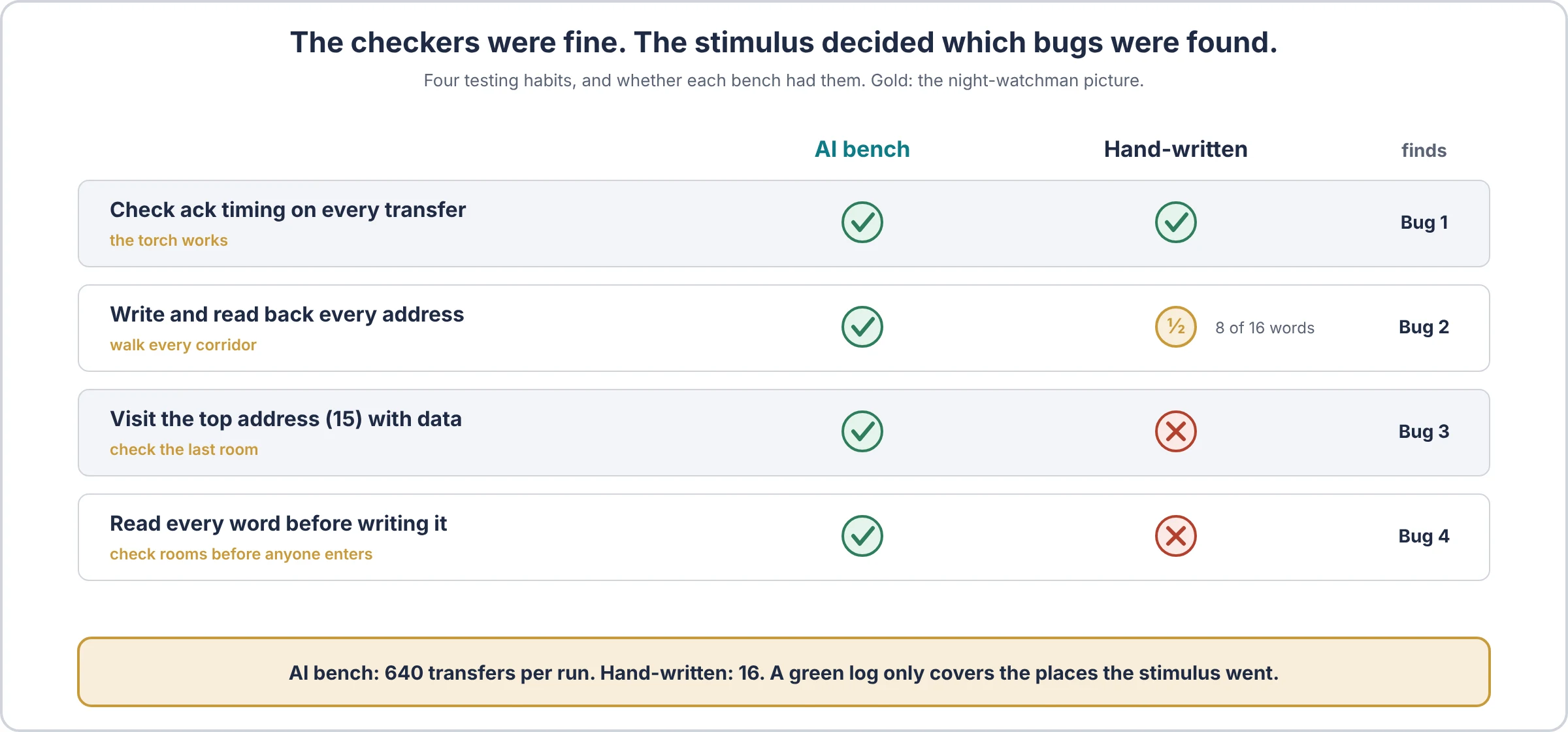
Its checker was fine. Its stimulus never went where the bugs were.
Think of a night watchman with a good torch who only walks half the building. The torch is not the problem.
| Habit | AI bench | Hand-written bench | Bug it finds |
|---|---|---|---|
| Timing check on every transfer | Yes, in the monitor | Yes, an SVA assertion | 1 |
| Write and read back every address | All 16, several times | 8 random words, once | 2 |
| Visit the top and bottom address | Yes (0 and 15 every pass) | Only by chance (15 not picked) | 3 |
| Read before write, after every reset | Yes, twice | Never | 4 |
| Transfers per run | 640 | 16 | all |
The hand-written bench was built for a different job. In the debug guide it is a teaching example, sized to show three planted testbench bugs in a short log. It was never meant to verify mem16, and a careful engineer writing a bench for this spec would not stop at 16 transfers.
That is exactly the point, though. A bench that was good enough for one job got quietly reused for another, and its green log looked the same either way. errors=0 tells you nothing about the places the stimulus never visited.
The check for this is coverage, not more checking: an address coverpoint and a “read before write” bin would have shown the hole on the first run. See types of coverage metrics for why code coverage alone would not have shown it. More on that in functional coverage in SystemVerilog.
What the AI did not do, and what a human still owns
A 4-of-4 score on a toy design does not mean the job is done. Here is what the AI never touched:
- The spec. The AI was only as good as the seven rules it was given. Rule 5 says “or 0 if not written since reset”. Without that sentence, bug 4 is not even a bug. Writing a spec that precise is human work, and it is most of the work. It is the same skill as writing a good verification plan.
- Choosing the bugs. Someone decided which four mistakes would prove anything, and made each one need a different habit to find.
- Running it. The AI never saw a simulator. A person compiled it, ran 10 simulations and read every log.
- Judging the errors. 158 errors for bug 2 is not a result until someone confirms they are real and not a checker mistake. Here they were. Next time they might not be.
- The slowest legal case. Neither bench ever saw an ack delay of 5, because this design never produced one. The AI’s histogram showed the gap; it did not close it.
The AI in verification guide puts it as a rule: the model suggests, a checker you trust decides. In this experiment the AI wrote the checker too, so the human’s job moved one step up: deciding whether the checker is right.
Honest limits of this test
- One design, one prompt, one run. It says nothing yet about an AXI interconnect or a CPU subsystem.
- The baseline is a small teaching bench, not a verification engineer’s best effort. This is “AI vs a small example bench”, not “AI vs an engineer”.
- Same family: the prompt and the hidden bugs were written by Claude in this project, and the AI under test is also Claude, a separate agent with no project context. The bugs were fixed in a file before the agent ran, and it never saw them. Try the same prompt with the tool you use; the files are below.
Human experience is what made the AI fast
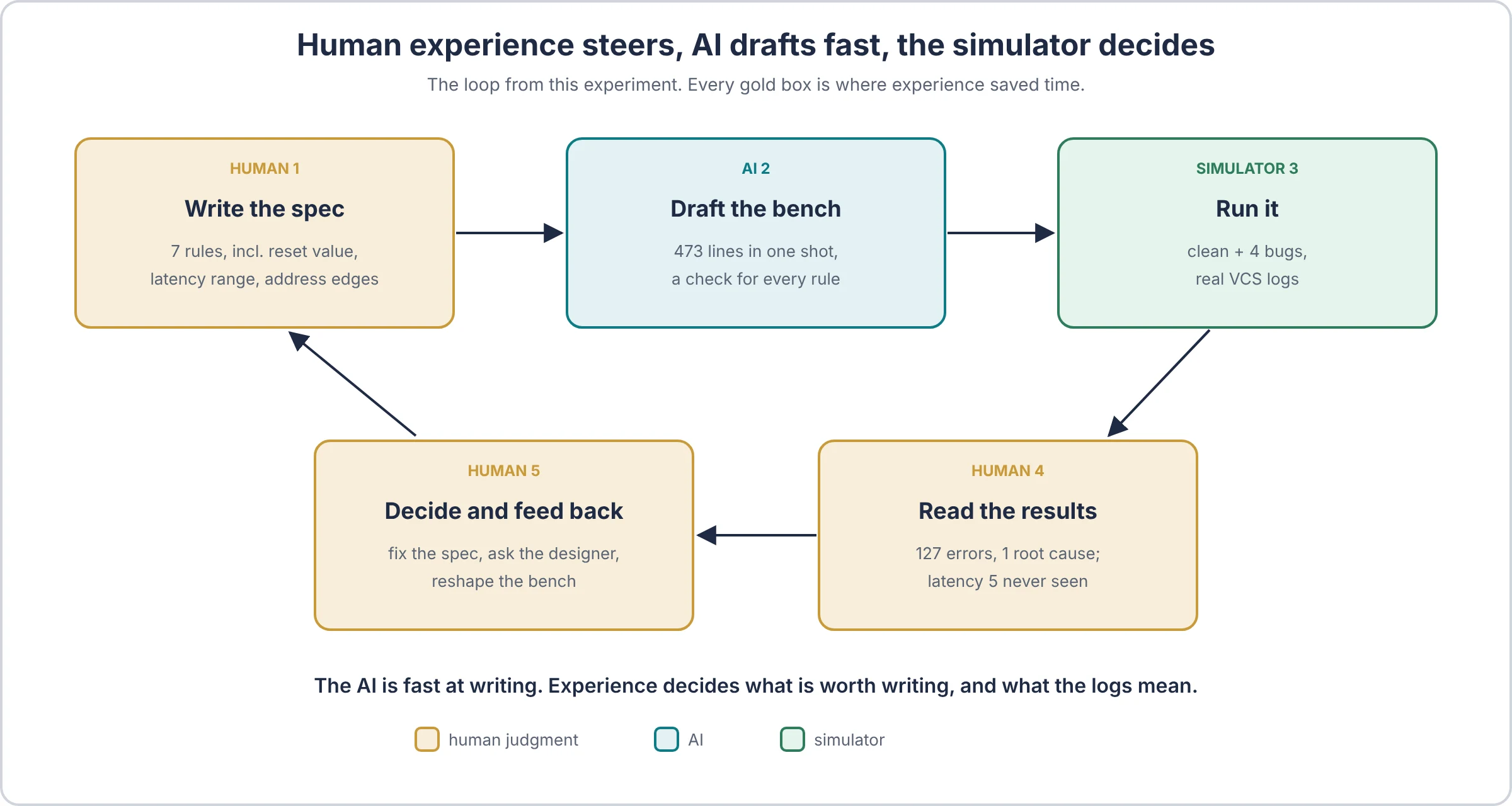
The AI did not find these bugs on its own. It found them because a human told it exactly what “correct” means. Every one of its four catches traces back to a sentence in the spec.
| Hidden bug | The spec rule a human wrote | What the AI turned it into |
|---|---|---|
| 1. Every 5th transfer acks after 6 cycles | Rule 3: ack “between 1 and 5 clock cycles” after req | A latency counter in the monitor (ACK_LAT) |
| 2. Writes to address 8 and up land on the wrong word | Rule 5: a read returns “the last value written to addr” | A reference model in the scoreboard |
| 3. A read of address 15 returns 0 | Rule 7: “All 16 addresses are valid” | Sequences that touch every address, checked by the scoreboard |
| 4. Word 5 is not 0 after reset | Rule 1: “all 16 words become 0” | A read-everything-first sequence and a reset check |
Think of the AI as a very fast new hire who has read every textbook but has never seen this chip. The senior engineer next to them knows where chips like this have broken before. The new hire types faster. The senior knows where to look.
Five ways your experience speeds the AI up
- Write rules as numbers, not feelings. “Ack in 1 to 5 cycles” became a working check on the first try. “Ack comes back quickly” would have given the AI nothing to check.
- Point it at the corners that have bitten you. You know the usual suspects: reset in the middle of traffic, the last address, back-to-back requests, a full FIFO, a clock crossing. Name them in the prompt and the AI writes those sequences in seconds. Leave them out and it guesses.
- Triage the first failure yourself. When a check fires, someone must decide: design bug, bench bug or a gap in the spec. The AI can suggest. You know which one it usually is on your project. The debug guide walks through that decision.
- Carry findings back to design and architecture. A rule that is hard to check is often hard to use. When verification keeps tripping over the same corner, a human takes that to the design review: fix the RTL, simplify the handshake, add a status bit or a debug counter so the next bug is easier to see. The AI does not sit in that meeting.
- Decide when it is done. Coverage goals, waivers and “good enough for tapeout” are judgement calls with a name attached. See coverage closure for how holes get argued.
What AI cannot do in ASIC verification (yet)
- Know the intent nobody wrote down. Half of a chip’s rules live in an architect’s head or an old email thread. The AI only checks what it is given.
- Spot a wrong spec. In this experiment the AI treated the spec as truth. If rule 3 had a typo, it would have checked the typo faithfully. A human who knows the system asks “that can’t be right”.
- Remember this chip’s history. Last tapeout’s errata, the IP block that always has reset trouble, the corner that escaped to silicon once. That memory is yours, and it is often the fastest route to the real bug.
- Weigh risk against schedule. With 300 failing seeds and two weeks to tapeout, someone picks which ten to chase first. That is a judgement about cost and risk, not a code task.
- See the whole system. Clocks, power, resets, firmware and performance all interact across teams and months of work. The AI sees one prompt at a time.
- Debug in the lab. Post-silicon work means scopes, boards and matching what the lab sees to what simulation said. That is still human work.
- Own sign-off. A person puts their name on “ready for tapeout”. An AI cannot carry that responsibility.
| Job | AI is good at | Human owns |
|---|---|---|
| Testbench code | Structure, boilerplate, many sequences fast | Which checks matter and why |
| Spec | Turning clear rules into checks | Writing the rules, and noticing when one is wrong |
| Debug | Reading logs, suggesting causes | Deciding design bug vs bench bug vs spec gap |
| Design feedback | Pointing at a failing corner | Changing the RTL or the architecture |
| Sign-off | Summing up coverage numbers | Saying “done” and owning it |
The AI writes the bench. You decide what the bench is for.
A stimulus checklist you can copy
The AI did most of these by default. Any bench can, with a sequence of a few lines each. Notice the mix: the AI used directed sequences for the corners and constrained random for the bulk, which is the balance described in directed testing vs constrained random verification.
- Read every address right after reset, before any write.
- Write and read back every address, not a random handful.
- Use patterns that expose stuck bits: all ones, alternating bits (A5A5, 5A5A), a single 1 at the bottom and at the top.
- Hit both ends of every range: address 0 and the last address, the shortest and the longest legal delay.
- Read straight after a write to the same address, with no idle cycle.
- Reset in the middle of the test, then read everything again.
- Count what you exercised: a histogram or coverpoint for delays, addresses and read-before-write.
- Make the scoreboard complain if it saw nothing, so a bench that sends no traffic cannot pass.
The last item is from the debug guide; the AI added a version of it on its own (“no completed reads or writes were observed”).
Download the files and try it yourself
Everything needed to repeat the experiment, in one zip (ai-uvm-testbench-experiment.zip):
| File | What it is |
|---|---|
prompt.txt | The exact prompt, including the spec |
spec.md | The mem16 spec on its own |
dut_mem16.sv | The design, with the 4 hidden bugs behind +BUG=N |
tb_ai_r0.sv | The AI’s testbench, first draft, unchanged |
tb_hand.sv | The hand-written baseline |
Run either bench against the design:
vcs -full64 -sverilog -ntb_opts uvm-1.2 dut_mem16.sv tb_ai_r0.sv -R +BUG=0
vcs -full64 -sverilog -ntb_opts uvm-1.2 dut_mem16.sv tb_hand.sv  -R +BUG=0
Then +BUG=1 to +BUG=4. On EDA Playground, put dut_mem16.sv in the design pane and +BUG=N in Run Options.
The best test of all: paste prompt.txt into the AI tool you use, run its bench against the same design, and see how many of the four it finds.
FAQ
Can AI write a UVM testbench? For a small, well-specified design, yes: here the first draft compiled on VCS and caught 4 of 4 hidden bugs. For larger designs, expect fix rounds, and always run it against known bugs before trusting it.
Did the AI see the bugs or the design? No. It saw the prompt and the spec only. The bugs were written into the design file before it ran.
Why did the hand-written bench miss bugs? Its stimulus covered 8 random words once and never read before writing. The checker was fine; the traffic never reached the bugs.
Does this mean verification engineers are not needed? No. Someone had to write a precise spec, choose meaningful bugs, run the simulator and judge every error. The AI saved typing; it did not replace judgment.
How do I check an AI-written testbench? Plant a few bugs that each need a different habit to find, and make sure the bench catches every one, with 0 errors on the clean design.
Which AI was used? A fresh Claude agent with no project history, given only the prompt. Try the same prompt with your own tool and compare.
Read next
- AI in ASIC verification: a practical method, with limits
- Practical verification debug guide: where this design and baseline bench come from
- Functional coverage in SystemVerilog: how to see the holes a green log hides
- UVM testbench architecture
- UVM macros, messaging and reporting: what sits behind every
uvm_errorin the logs above - Different stages of IP verification: where a first-draft bench fits in a real project
- UVM interview questions: test yourself on the pieces the AI wrote