
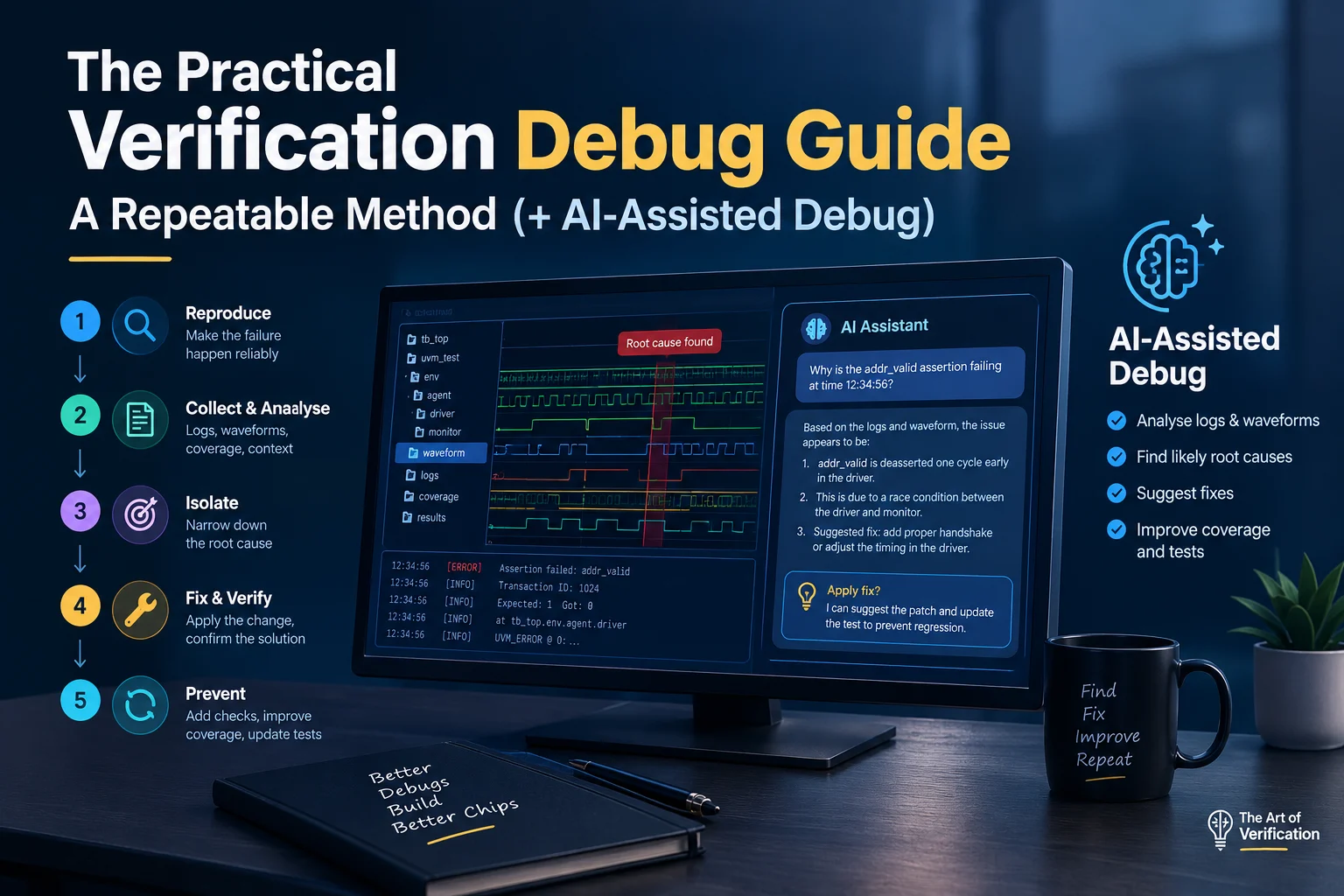
The Practical Verification Debug Guide: A Repeatable Method (+ AI-Assisted Debug)
DEBUG | UVM | SYSTEMVERILOG | AI-ASSISTED VERIFICATION
Updated October 2026 · By The Art of Verification
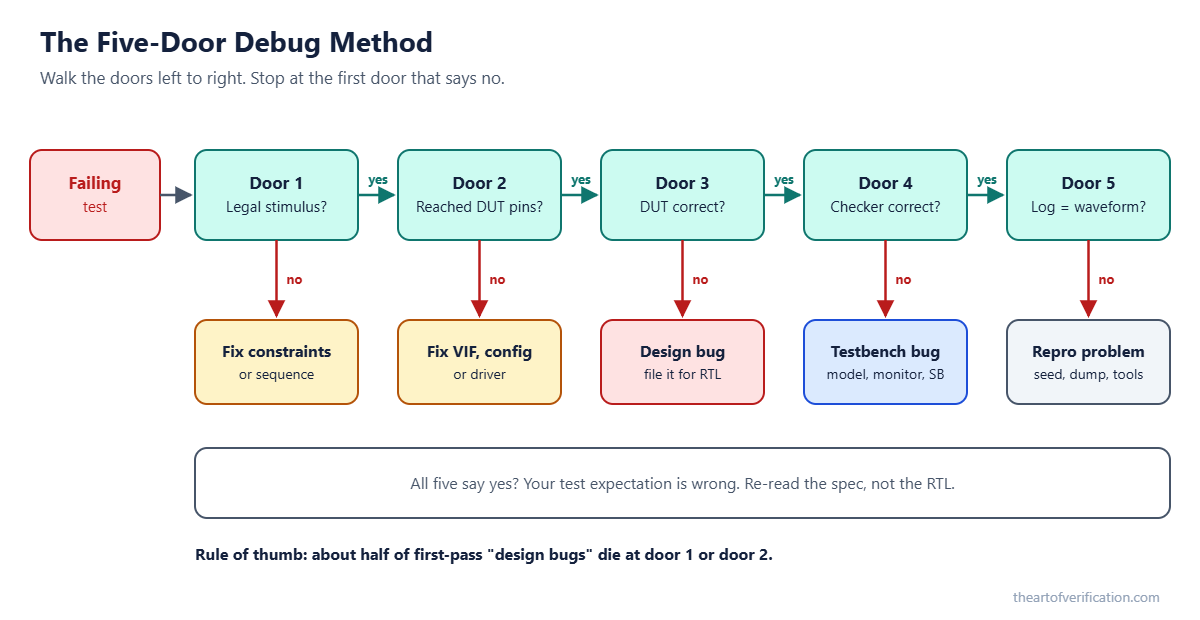
Quick answer: A repeatable verification debug method is a fixed order of five questions. 1) Was the stimulus legal? 2) Did it reach the DUT pins? 3) Did the design respond correctly? 4) Did the checker judge it correctly? 5) Do the log and waveform agree? Stop at the first “no”. That door holds your root cause. AI tools can now sort logs and suggest the door, but an engineer still confirms the cycle in the waveform before any fix.
Key takeaways
- Debug is the biggest single slice of a verification engineer’s week. Method beats talent.
- Walk five doors in order: legality, delivery, design, checking, consistency.
- About half of first-pass “design bugs” are really illegal stimulus or stimulus that never arrived.
- Read the first UVM_ERROR, not the last. Later errors are usually echoes.
- In the waveform, start at the symptom and walk backward.
- Group regression failures by signature before you debug any single test.
- AI is great at reading and sorting. You still own the verdict.
Table of contents
- Why debug skill decides your schedule
- Three analogies that make debug click
- The five-door debug method
- How to build a UVM testbench that explains its own failures
- SystemVerilog code: print, check, assert
- How to read a waveform without getting lost
- How to read UVM reports fast
- Common RTL and testbench bugs, by symptom
- How to triage a big regression in one morning
- AI-assisted debug: a practical flow you can run today
- Real debug stories from IP, subsystem and SoC
- Interview questions
- FAQ
- Printable checklists
Why does debug skill decide your schedule?
Ask where a chip schedule really goes. The answer is rarely “writing tests”. It is figuring out why tests failed.
- The Wilson Research Group functional verification study found verification engineers spend more time in debug than in any other activity, about 44% of their time in the 2018 edition (Siemens Verification Horizons).
- The 2024 edition reported only 14% of projects hit first silicon success, the lowest in two decades (Verification Academy).
Put those two numbers together. Nearly half your week goes to debug, and most chips still need another spin. So the way you debug is not a side skill. It is the job.
Two engineers with the same tools can differ ten times in throughput:
- The slow one opens the waveform first, drowns in thousands of signals, and loses an afternoon per failure.
- The fast one narrows the problem to one layer before opening any viewer, and finds root cause in minutes.
There is a second cost too. A regression full of false failures trains the team to ignore red. Then a real bug walks through in the noise. Good debug keeps the regression honest.
What is a good analogy for debug in verification?
Pick whichever one sticks. They all say the same thing: check in order, from cheap to expensive.
1. The missing letter
Your letter never reached your friend. You do not blame the post office first. You check:
- Did I write the right address? (door 1, legal stimulus)
- Did I actually drop it in the box? (door 2, delivery)
- Did the post office route it right? (door 3, design)
- Did my friend check the right mailbox? (door 4, checker)
- Am I sure I am remembering the right day? (door 5, consistency)
Blaming the design first is like blaming the post office before checking the address.
2. The doctor who checks vitals before the MRI
A good doctor takes temperature and blood pressure before ordering an MRI. The waveform is your MRI. It shows everything, it is slow, and it is useless if you do not know where to look. Logs and assertions are your vitals. Read them first.
And when the thermometer says 45°C but the patient looks fine, you check the thermometer. That is a monitor bug.
3. The match replay
When a volleyball team reviews a lost point, nobody rewinds to the warm-up. You start at the point that was lost and go back one touch at a time: bad set, late pass, wrong rotation. That is exactly how to read a waveform. Start at the mismatch. Walk back one cause at a time.
What is the five-door debug method?
Every failure lives behind one of five doors. Walk them in order and close each one until only the guilty one is open.
| Door | Question | Where to look | Typical guilty party |
|---|---|---|---|
| 1. Legality | Was the stimulus legal? | Solved item print, constraints, sequence | Missing or wrong constraint |
| 2. Delivery | Did it reach the DUT pins? | Driver log, interface signals | Virtual interface or config_db |
| 3. Design | Did the DUT respond correctly? | First failing assertion, RTL waveform | RTL bug |
| 4. Checking | Did the checker judge correctly? | Scoreboard, reference model, monitor | Testbench bug |
| 5. Consistency | Do log and waveform agree? | Seed, timestamps, tool versions | Stale dump or wrong seed |
Why the order matters: each door you clear removes a whole layer from the suspect list. Skip ahead to the RTL waveform and every layer stays a suspect. That is why unstructured debug feels endless.
The idea underneath: a failure has one first cause and many downstream effects. Logs and waves show effects everywhere. Your only job is to find the earliest cycle where correct became incorrect.
If all five doors say yes, your test expectation is wrong. Go back to the spec, not the RTL.
How do you build a UVM testbench that explains its own failures?
Debug speed is designed in, not bolted on. Your component boundaries are your debug boundaries.
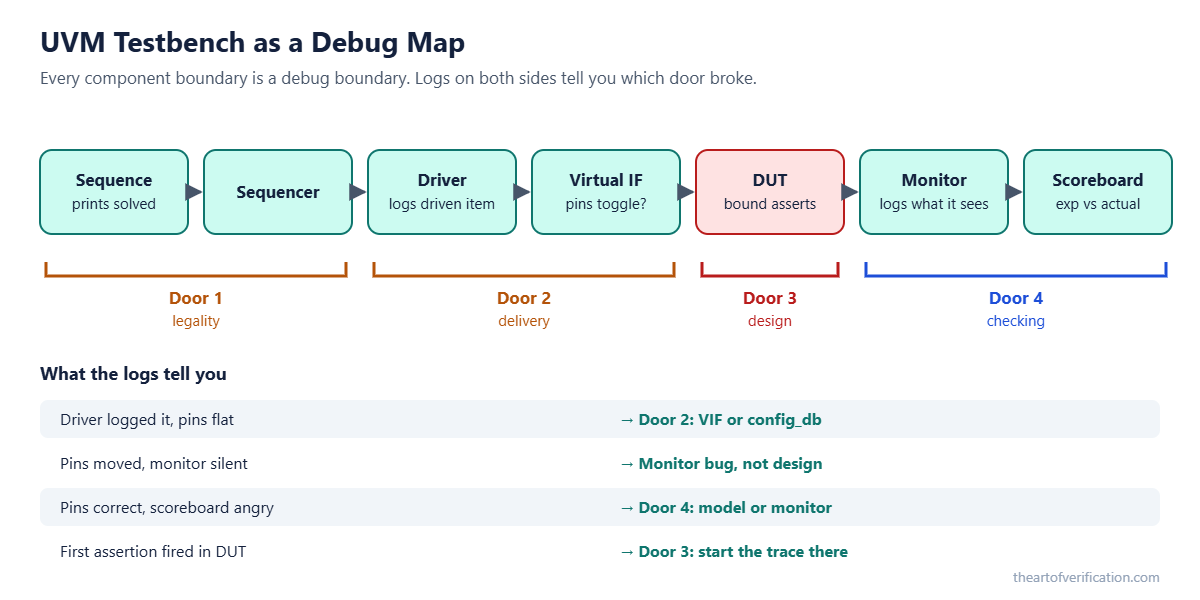
What each component should do for you:
- Sequence: print the solved item and reject illegal combinations. This moves most door 1 problems out of debug entirely.
- Driver: log every item it drives, with the cycle. Driver logged it but pins stayed flat? Door 2, the interface is not connected.
- Monitor: passive and complete. Rebuild every transaction and timestamp it. A monitor that misses one creates a fake mismatch.
- Scoreboard: on a mismatch, print expected, actual, and the source transaction. Snapshot shared model state before you compare.
- Everyone: use consistent message IDs so a simple grep finds the story.
New to the plumbing? Start with the typical UVM testbench architecture, the build a UVM environment series, sequencer and driver communication, and passing a virtual interface with uvm_config_db.
What SystemVerilog code makes debug faster?
Honesty note: the code below follows the SystemVerilog and UVM standards and common practice. It was not captured from a specific simulator run. Compile it in your own flow before relying on it.
Door 1: print what was really sent
Print the solved transaction, not the one you think you sent. Bad, good, best:
// BAD: you print your intent, not the solved values.
// An illegal randomized value stays invisible.
`uvm_info("SEQ", "sending a 4-beat burst to 0x1000", UVM_LOW)
`uvm_do(item)

// GOOD: print the solved item after randomization.
function void post_randomize();
  `uvm_info("SEQ", $sformatf("addr=%0h len=%0d size=%0d burst=%0d",
            addr, len, size, burst), UVM_LOW)
endfunction

// BEST: print it AND self-check legality, so an illegal
// stimulus fails loudly here, not later as a fake design bug.
function void post_randomize();
  `uvm_info("SEQ", $sformatf("addr=%0h len=%0d size=%0d burst=%0d",
            addr, len, size, burst), UVM_LOW)
  if (addr[11:0] + (len + 1) * (1 << size) > 13'h1000)
    `uvm_error("SEQ_ILLEGAL", "AXI INCR burst crosses a 4KB boundary")
endfunction- Why it exists: an illegal burst makes the design misbehave correctly. Without this print you chase a ghost.
- Next step: move the check into a shared protocol checker so every sequence gets it for free. The rules are in the AXI protocol verification guide.
Door 3: let an assertion mark the crime scene
// Fails at the exact cycle ack is late.
property p_req_then_ack;
  @(posedge clk) disable iff (!rst_n)
  req |-> ##[1:5] ack;
endproperty
a_req_ack: assert property (p_req_then_ack)
  else `uvm_error("PROT_REQ_ACK", "ack did not follow req within 5 cycles")

// Prove the precondition actually happens.
c_req: cover property (@(posedge clk) disable iff (!rst_n) req);- An assertion turns a long backward trace into one log line with a timestamp.
- The cover matters. An assertion whose precondition never fires proves nothing. Same vacuity trap as in the formal verification deep dive.
- Bind assertions to the RTL module so they travel with the design into every test.
Door 4: a scoreboard a reviewer can trust
// Snapshot first, compare second, print everything on a miss.
function void check_item(axi_item act);
  axi_item exp = model.predict_snapshot(act);   // copy, not a live handle
  if (!act.compare(exp))
    `uvm_error("SB_MISMATCH", $sformatf("\nEXP: %s\nACT: %s\nSRC: %s",
               exp.convert2string(), act.convert2string(), act.src_txn_id))
endfunction
How do you read a waveform without getting lost?
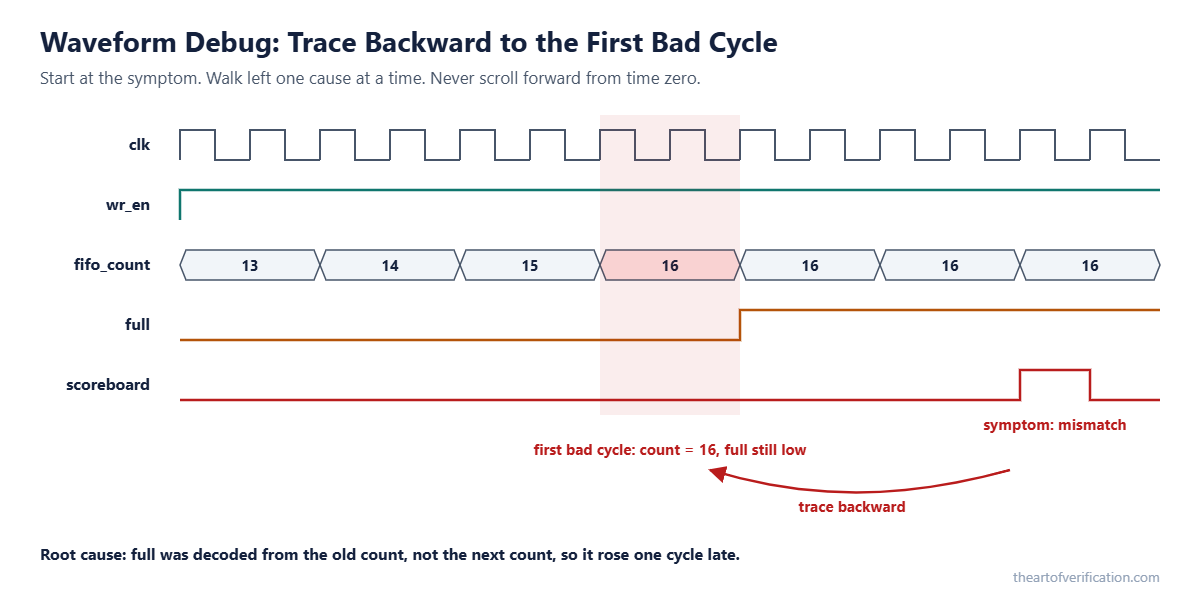
- Jump to the failing time from the first error. Never scroll forward from time zero.
- Add only the signals of the failing interface plus the first failing assertion.
- Walk back one cause at a time. Ask “what made this value wrong?” and move one hop upstream.
- Drop a marker at each hop so the next engineer can follow your trail.
- Name the signal and the exact cycle in your bug report. “It looks wrong around the middle” helps nobody.
Door 2 quick read:
| What you see | What it means | Next step |
|---|---|---|
| Driver logs a send, pins stay flat | Virtual interface not connected | Check uvm_config_db set and get paths |
| Pins toggle, no ready | DUT not accepting | Go to door 3 |
| Handshake completes | Delivery is fine | Go to door 3 |
How do you read UVM reports fast?
The report summary tells you the shape of the failure before you open anything. Read top down. The first UVM_ERROR is usually the cause.
| Report clue | Likely cause |
|---|---|
| Many errors at the same timestamp | One root event, checks cascading |
| Error, long silence, then timeout | Design hung after the first error |
| Only a UVM_FATAL about config | Environment build problem, not a design bug |
| Objection drop warning | Test ended before stimulus finished |
| Failure vanishes with full dump on | Race or uninitialized value, timing shifted |
Run the regression at low verbosity for speed. Rerun only the failing seed at high verbosity for detail.
What are the most common RTL and testbench bugs?
RTL bugs, by symptom
| Symptom | Common RTL cause | How to confirm |
|---|---|---|
| Data right, one cycle late | Missing or extra pipeline stage | Count register stages in the wave |
| Fails on some seeds only | Uninitialized register or race | Look for X right after reset |
| Fails after back-to-back requests | FIFO full or empty off by one | Watch occupancy at the boundary |
| Hang under heavy load | Arbitration deadlock | Check grants when all agents request |
| Wrong only across clock domains | Missing synchronizer | See the CDC verification guide |
| Passes RTL, fails gates | X-propagation or timing | See the gate-level simulation guide |
Testbench bugs that look like design bugs
- Virtual interface never set, so the driver drives nothing.
- Scoreboard compares before the design has produced the result.
- Objection dropped too early. The test ends mid-traffic and looks like a hang.
- Reference model misses a legal reordering and flags correct behavior.
- Coverage sampled on the wrong edge, so a real hit looks like a hole.
- Factory override forgotten. The old component runs and your fix “does nothing”.
Rule of thumb: design bugs tend to be narrow. Testbench bugs tend to be broad. When unrelated tests fail the same odd way, suspect shared testbench code first. Treating your own testbench as a suspect is a sign of a senior engineer. More on that mindset in the thought process behind great verification.
Coverage symptoms that send you the wrong way
| Coverage symptom | What it usually means |
|---|---|
| Hole in a bin you know you drove | Sample edge or condition is wrong |
| Hole in a truly rare bin | Stimulus never got there. Likely bug hiding place. |
| Sudden drop after a merge | A covergroup got disconnected |
Background: types of coverage metrics, functional coverage guidelines, and the coverage closure guide.
How do you triage a big regression in one morning?
Picture the morning after a nightly run on a subsystem with a CPU, a DMA engine and a memory controller. Two hundred red tests. Coffee is still hot.
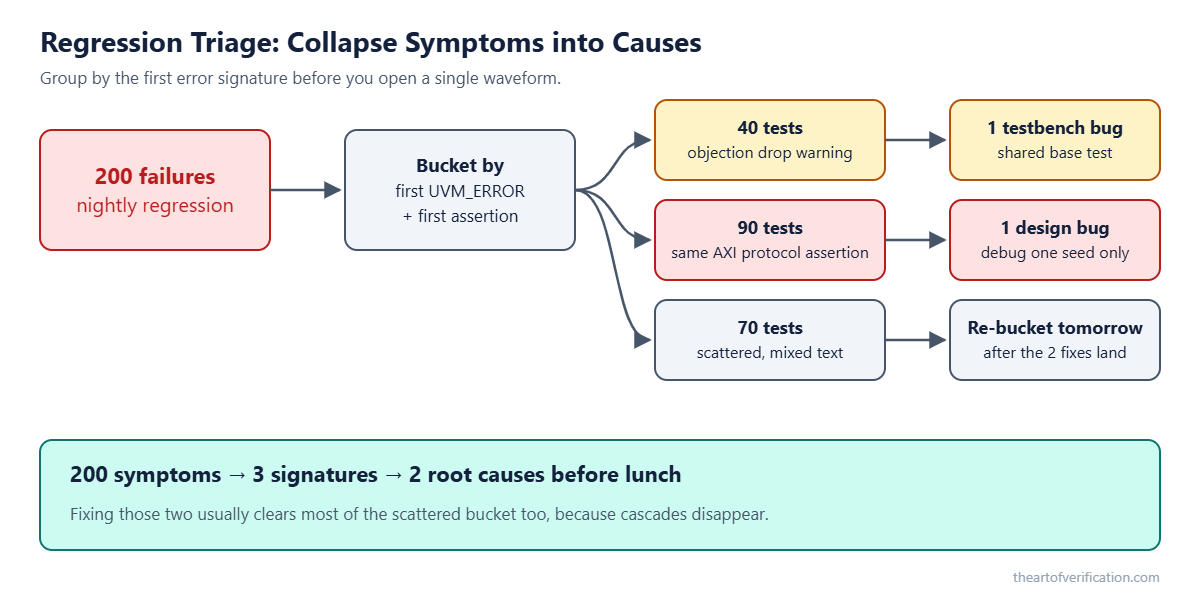
- Bucket first. Group by first UVM_ERROR text and first failing assertion, with numbers and timestamps stripped out.
- Read the buckets, not the tests. 40 share an objection warning from a shared base test. 90 hit the same AXI assertion. 70 are scattered.
- Debug one seed per bucket. The shortest, lowest-seed failure in each group.
- Check what changed. Diff RTL and testbench files since the last green run.
- Re-bucket after fixes land. Most scattered failures are cascades and vanish on their own.
Keep debug cheap while you do it:
| Setting | Runtime cost | When to use |
|---|---|---|
| Full dump, whole run | Several times slower | Rare, hard bugs only |
| Windowed dump around failure | Small | Default for reruns |
| High verbosity, whole regression | Huge logs, slower | Avoid. Rerun one seed instead. |
| Assertion-only run | Fast | First-pass protocol triage |
Always save the seed and command line for every job. A failure you cannot reproduce is a rumor, not a bug.
How can AI help with verification debug?
This part changed a lot in 2026. All three big EDA vendors now ship or preview AI agents aimed at debug:
- Siemens announced the Questa One Agentic Toolkit in February 2026, including a Debug Agent that correlates waveforms, assertions, coverage and logs to point at suspicious transitions and suggest failure mechanisms for an engineer to review (Siemens).
- Synopsys unveiled a Verification AgentEngineer in March 2026 that reads logs, groups errors, and checks the likely cause against waveforms. Synopsys also reported a 25% to 40% cut in debug cycle time in an early evaluation (Tom’s Hardware).
- Cadence opened early access to its ChipStack agents in February 2026, aimed at front-end design and verification loops.
Two honest caveats. These numbers are vendor-reported and measured against different baselines. And every one of these tools keeps a human approving the final root cause. That tells you where the real line sits.
Here is the way I think about it: AI is a very fast junior engineer who has read every log but never seen the spec. Brilliant at reading and sorting. Not yet trusted to sign off. So give it the reading work, and keep the judgment.
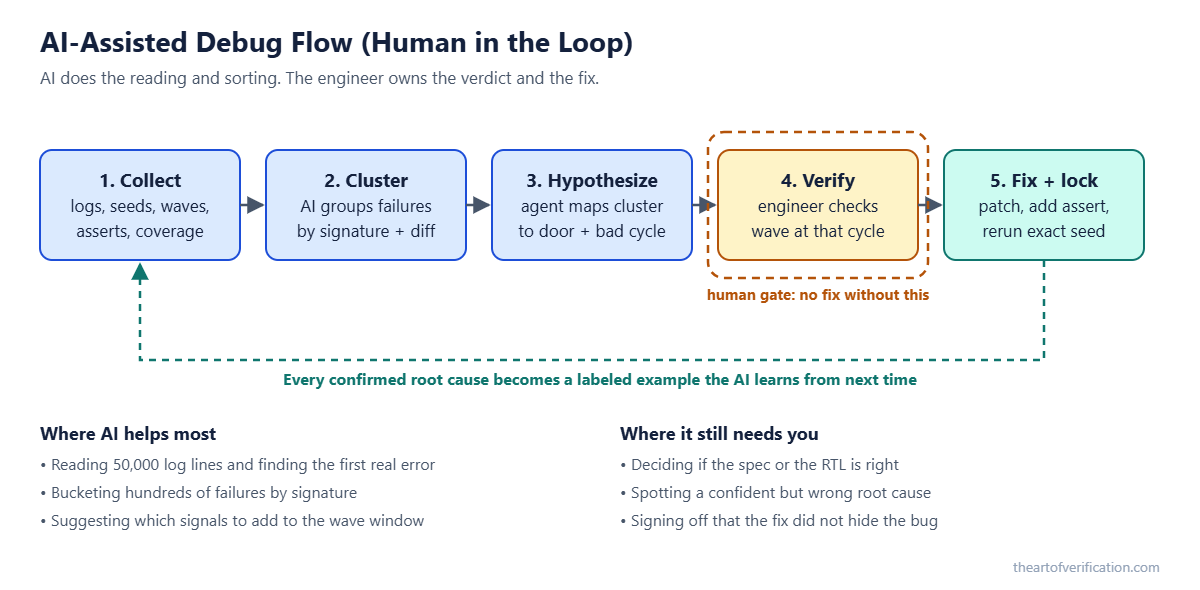
The AI-assisted debug flow, step by step
- Make your logs machine-readable. One line per transaction, stable message IDs, seed and test name in the header. Good logs help humans and AI equally.
- Cluster failures automatically. Normalize the first error line and bucket. You do not even need an LLM for this step (script below).
- Ask the AI for a door, not a fix. Feed it the first error, about 200 lines of context, and the diff since the last green run. Ask which of the five doors is most likely guilty and why.
- Human gate. You open the waveform at the cycle it named and confirm or reject. No fix goes in without this.
- Fix and lock. Patch, add an assertion or check, rerun the exact seed, then the bucket.
- Feed it back. Store the signature, door, and root cause. That history makes the next suggestion better.
Step 2 script: bucket failures by first error
# bucket_failures.py : group regression failures by normalized first error
import re, sys, collections, pathlib

ERR = re.compile(r'^(UVM_ERROR|UVM_FATAL)\s.*@')
NORM = [(r'@\s*[\d.]+\s*[munpf]?s?', '@T'),        # timestamps
        (r"(0x|'h)[0-9a-fA-F_]+", 'HEX'),           # hex values
        (r'\b\d+\b', 'N')]                           # decimal numbers

def signature(text):
    for line in text.splitlines():
        if ERR.match(line):
            for pat, rep in NORM:
                line = re.sub(pat, rep, line)
            return line.strip()[:160]
    return 'NO_UVM_ERROR (check timeout or crash)'

buckets = collections.defaultdict(list)
for log in pathlib.Path(sys.argv[1]).glob('*/sim.log'):
    buckets[signature(log.read_text(errors='ignore'))].append(log.parent.name)

for sig, tests in sorted(buckets.items(), key=lambda kv: -len(kv[1])):
    print(f'{len(tests):4d}  {sig}\n      e.g. {tests[0]}')
Step 3 prompt: keep the AI inside the five doors
You are helping debug a UVM simulation failure.
Use the five-door order: 1 legality, 2 delivery, 3 design,
4 checker, 5 consistency.

Inputs: first error + 200 lines of log, solved item print,
git diff since last passing run.

Answer with:
- Most likely door and a confidence (low / medium / high)
- The exact log line numbers that support it
- One signal and one sim time I should check in the waveform
- What evidence would prove you wrong
Do not propose an RTL fix.
Why “what would prove you wrong”? Because AI tools sound just as sure when they are guessing. Asking for line numbers and a falsifying check turns a confident paragraph into something you can verify in two minutes.
Guardrails that matter
- Never paste RTL, specs or logs into a public chatbot. Use your company’s approved, on-prem or enterprise setup.
- Demand evidence. No line numbers, no trust.
- Watch for the “clean story” trap. A tidy explanation that does not match the waveform is still wrong.
- Measure it. Track time to first root cause and how often the suggested door was right. If it is not saving time after a month, change the inputs.
Real debug stories from IP, subsystem and SoC
IP: the FIFO that said “full” one cycle late
- Symptom: mismatch only when reads and writes hit the same cycle near full.
- Doors 1 and 2: clean.
- Door 3: the full flag rose one cycle late, so one write landed in a full FIFO.
- Root cause: full was decoded from the current count, not the next count.
- Lock: one-line fix plus an assertion “never accept a write when full”.
Subsystem: the design was innocent
- Symptom: DMA plus memory controller failing on one seed in a few hundred.
- First instinct: RTL race. Two engineers lost a day in the waveform.
- Door 4: the reference model read a variable that a parallel testbench thread updated mid-compare.
- Fix: snapshot the value before comparing. Lesson: clear the checker before a long RTL hunt.
SoC: the “hang” that was not a hang
- Symptom: firmware test hung after a merge. Two hundred errors.
- Move: read the first UVM error, not the last.
- Root cause: a base sequence dropped its objection before the CPU finished booting.
- More SoC context in key areas of SoC verification and the SoC verification flow.
Debug interview questions for verification engineers
- A test fails. What do you check first?
Whether the stimulus was legal, by printing the solved transaction. - Design bug or testbench bug, how do you decide?
Design bugs are narrow. Broad failures across unrelated tests point at shared testbench code. - Thousands of signals. Where do you start?
At the failing time, walking backward from the first failing assertion. - Why read the first UVM error and not the last?
The first is usually the root. Later ones are cascades. - Lead-level: 100 tests fail the same way after a merge.
Treat it as one cause. Read one representative’s first error and diff the changed files. - How would you use AI in debug safely?
For clustering and log reading on approved tools, with evidence required and a human confirming in the waveform.
FAQ
What is the first step in debugging a failing UVM test?
Reproduce it with the saved seed and command line, then print the solved transaction to check the stimulus was legal.
Should I always open the waveform first?
No. The waveform is door 3. Clear legality and delivery first using logs.
Why does my failure disappear when I turn on waveform dumping?
Dumping can shift timing. That is a strong hint of a race or an uninitialized value.
How do I tell a monitor bug from a design bug?
If the DUT pins show the correct value but the scoreboard disagrees, suspect the monitor or reference model.
How do I debug a simulation hang?
Find the last activity before silence, check for a dropped objection, and look at arbitration grants when every agent is requesting.
Can AI find root cause in chip verification on its own?
Not reliably yet. 2026 agents from Siemens, Synopsys and Cadence speed up log reading, clustering and waveform correlation, but all keep an engineer approving the final root cause.
What is the fastest way to triage a big regression?
Bucket failures by normalized first error, debug one seed per bucket, and diff changes since the last green run.
Printable debug checklists
Debug checklist (every failure)
- Reproduce with the recorded seed and command line.
- Door 1: print and judge the solved stimulus.
- Door 2: driver log vs interface pins.
- Door 3: first failing assertion, then trace backward.
- Door 4: expected vs actual, decide which to trust.
- Door 5: seed and timestamps match the log.
Testbench checklist
- Sequences print solved items and reject illegal ones.
- Driver and monitor log each transaction with a timestamp.
- Scoreboard snapshots shared state before compare.
- Message IDs are consistent and grep-friendly.
- Assertion messages name the rule that broke.
RTL checklist
- Counters and FIFO flags checked at boundaries.
- Every register has a reset value. No X after reset.
- Every clock crossing has a reviewed synchronizer.
- Internal invariants carry designer assertions.
Regression and AI checklist
- Seed and command line saved per job.
- Windowed dump by default.
- Failures bucketed by signature before triage.
- AI suggestions come with log line numbers.
- No fix without a human waveform check.
Signoff checklist
- Every root cause added an assertion or check.
- No open failure without a documented root cause.
- Coverage drops after merges were investigated.
Summary
Debug is an order, not a gift. Legality, delivery, design, checking, consistency. Print before you blame. Read the first error. Walk the waveform backward. Group before you dig. Let AI do the reading, and keep the verdict for yourself.
The engineer who finds bugs fast is rarely the smartest one in the room. Just the most orderly one. 🔍
Related reading and learning path
- Typical UVM Testbench Architecture
- AXI Protocol Verification Guide
- CDC Verification Guide
- Gate-Level Simulation Guide
- Formal Verification Deep Dive
- Coverage Closure Guide
- The Thought Process Behind Great Verification
Part of the learning path Verification fundamentals