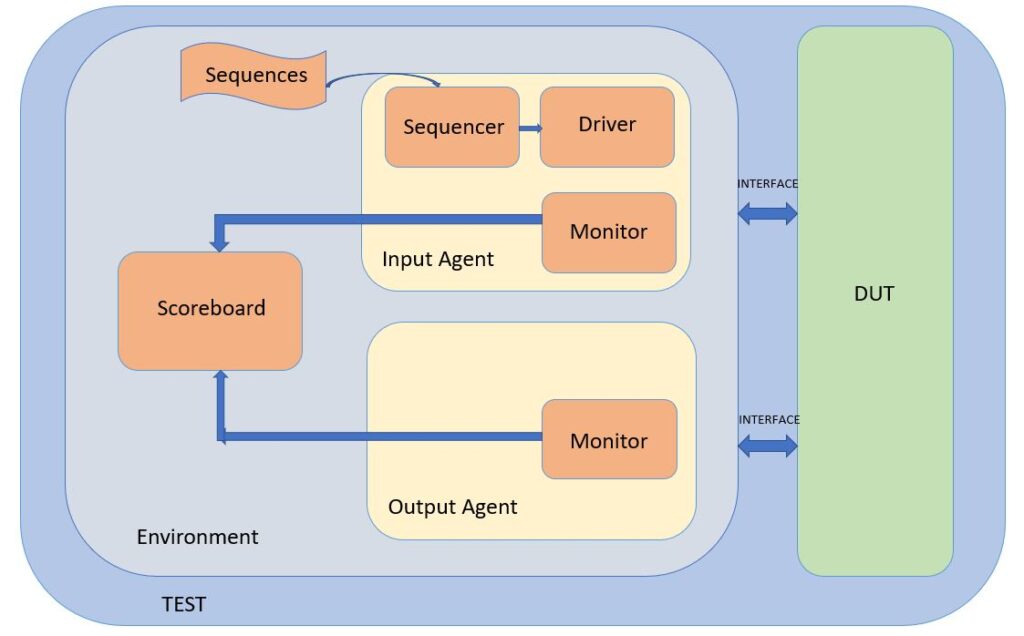
Typical UVM Testbench Architecture
In short: A UVM testbench is a stack of reusable classes. The sequence item is one packet of stimulus, the sequence decides what packets to send, the sequencer schedules them, the driver turns them into pin wiggles, the monitor reads pins back into packets, the agent groups the sequencer plus driver plus monitor for one interface, the scoreboard checks results, and the environment plus test tie everything together. Each layer has one job, so you can swap or reuse any piece without breaking the rest.
If you are new to verification, a UVM testbench can look like a wall of class names: agent, driver, sequencer, monitor, scoreboard. This guide walks through every layer one at a time, with a running example, code you can read, comparison tables, and the mistakes people hit most often. By the end you will know what each block does, why it exists, and how a single stimulus packet travels from your test all the way down to the pins of the design and back.
A simple way to picture it
Think of a busy restaurant. A customer writes an order on a slip of paper (the sequence item). The waiter collects a stack of orders for the evening (the sequence) and hands them to the kitchen expeditor (the sequencer), who decides the order things get cooked in. The line cook (the driver) actually turns each order into a real plate of food (pin activity on the design). A quality checker at the pass (the monitor) looks at every plate leaving the kitchen and writes down what was really served. The head chef (the scoreboard) compares what was served against what should have been served. The restaurant manager (the environment) hires the whole team, and the owner (the test) decides what kind of night it is going to be: a quiet dinner or a rush.
That single picture maps one-to-one onto UVM. Keep it in mind as we go through each real component below.
The sequence item: one packet of stimulus
The sequence item is the smallest unit of traffic. It is a class that extends uvm_sequence_item and holds the fields the design cares about, marked rand so the solver can randomize them. Constraints keep the random values legal. Here is a bus write/read request for a simple memory-bus design we will reuse through the whole guide.
class bus_item extends uvm_sequence_item;
  rand bit [15:0] addr;
  rand bit [31:0] data;
  rand bit        is_write;

  // legal address window only
  constraint c_addr { addr inside {[16'h0000:16'h0FFF]}; }
  // reads do not carry meaningful write data
  constraint c_rd   { (is_write == 0) -> data == 32'h0; }

  `uvm_object_utils_begin(bus_item)
    `uvm_field_int(addr,     UVM_ALL_ON)
    `uvm_field_int(data,     UVM_ALL_ON)
    `uvm_field_int(is_write, UVM_ALL_ON)
  `uvm_object_utils_end

  function new(string name = "bus_item");
    super.new(name);
  endfunction
endclass
Two things matter here. First, using the field macros gives you free copy, compare, and print, which you will lean on later in the scoreboard. Second, the constraints live with the item, not scattered in tests, so every sequence that builds a bus_item automatically gets legal traffic.
A second, richer example: a constrained burst item
Real protocols rarely send single beats. Here is the same idea extended to a burst, showing how one item can describe many beats while staying legal.
class burst_item extends uvm_sequence_item;
  rand bit [15:0]        base_addr;
  rand int unsigned      len;          // number of beats
  rand bit [31:0]        payload[];    // one entry per beat

  constraint c_len  { len inside {[1:8]}; }
  constraint c_size { payload.size() == len; }
  constraint c_win  { base_addr + (len*4) <= 16'h1000; } // stay in range

  `uvm_object_utils(burst_item)
  function new(string name = "burst_item"); super.new(name); endfunction
endclass
Notice how c_win uses the randomized len to keep the whole burst inside the legal window. Putting that math in a constraint means you never generate an illegal burst by accident, no matter which sequence creates it.
The sequence: the plan for what to send
A sequence is a class that extends uvm_sequence and decides which items to create, how to randomize them, and in what order. The sequence does not touch pins. It only builds items and hands them to the sequencer using the start_item / finish_item handshake (or the `uvm_do macros). Here is a directed-then-random sequence that first writes a known value, then reads it back, then sends random traffic.
class write_read_seq extends uvm_sequence #(bus_item);
  `uvm_object_utils(write_read_seq)
  function new(string name = "write_read_seq"); super.new(name); endfunction

  task body();
    bus_item req;

    // 1) directed write to a known address
    req = bus_item::type_id::create("wr");
    start_item(req);
    assert(req.randomize() with { addr==16'h100; is_write==1; data==32'hCAFE; });
    finish_item(req);

    // 2) directed read from the same address
    req = bus_item::type_id::create("rd");
    start_item(req);
    assert(req.randomize() with { addr==16'h100; is_write==0; });
    finish_item(req);

    // 3) ten fully random legal transactions
    repeat (10) begin
      req = bus_item::type_id::create("rnd");
      start_item(req);
      assert(req.randomize());
      finish_item(req);
    end
  endtask
endclass
This pattern, a little directed traffic to set up a known state followed by random traffic to find surprises, is one of the most useful things you can copy into your own work. It gives you a repeatable checkpoint and broad coverage in the same run.
Reusing sequences with layering
Sequences call other sequences. A higher-level sequence can run the write_read_seq many times with different settings, which keeps each sequence small and reusable.
class regression_seq extends uvm_sequence #(bus_item);
  `uvm_object_utils(regression_seq)
  function new(string name="regression_seq"); super.new(name); endfunction
  task body();
    write_read_seq wr;
    repeat (5) begin
      wr = write_read_seq::type_id::create("wr");
      wr.start(m_sequencer);   // run the child on the same sequencer
    end
  endtask
endclass
The sequencer: the traffic scheduler
The sequencer sits between sequences and the driver. When several sequences want to run at once, the sequencer arbitrates: it decides whose item goes next. In most testbenches you never write a custom sequencer; you just parameterize the built-in one with your item type.
typedef uvm_sequencer #(bus_item) bus_sequencer;That single line gives you a full-featured scheduler. You only write a custom sequencer if you need special arbitration, a lock/grab policy, or a response path back to sequences.
The driver: turning packets into pin wiggles
The driver is where software meets hardware. It pulls one item at a time from the sequencer with get_next_item, drives the design pins through a virtual interface following the protocol timing, then calls item_done. This get / drive / done loop is the heartbeat of every driver you will ever write.
class bus_driver extends uvm_driver #(bus_item);
  `uvm_component_utils(bus_driver)
  virtual bus_if vif;

  function new(string name, uvm_component parent);
    super.new(name, parent);
  endfunction

  function void build_phase(uvm_phase phase);
    super.build_phase(phase);
    if (!uvm_config_db#(virtual bus_if)::get(this, "", "vif", vif))
      `uvm_fatal("NOVIF", "virtual interface not set for driver")
  endfunction

  task run_phase(uvm_phase phase);
    forever begin
      bus_item req;
      seq_item_port.get_next_item(req);   // 1) get
      drive(req);                         // 2) drive pins
      seq_item_port.item_done();          // 3) done
    end
  endtask

  task drive(bus_item req);
    @(posedge vif.clk);
    vif.addr     <= req.addr;
    vif.wdata    <= req.data;
    vif.we       <= req.is_write;
    vif.valid    <= 1'b1;
    @(posedge vif.clk);
    vif.valid    <= 1'b0;
  endtask
endclass
The three-step loop never changes. What changes between protocols is only the body of drive(): the exact pins, the handshake, and the timing. Learn the loop once and every driver becomes familiar.
Common driver mistakes
Two bugs show up again and again. First, forgetting to call item_done, which makes the sequence hang forever waiting for its item to finish. Second, driving combinational values instead of using non-blocking assignment on a clock edge, which creates races against the design. Always sync to a clock edge and always close the loop with item_done.
The monitor: reading pins back into packets
The monitor is passive. It never drives anything. It watches the same interface the driver uses, reconstructs a transaction whenever it sees a valid bus cycle, and broadcasts that transaction to anyone listening through an analysis port. This is how the scoreboard and coverage collectors get their data without touching the pins.
class bus_monitor extends uvm_monitor;
  `uvm_component_utils(bus_monitor)
  virtual bus_if vif;
  uvm_analysis_port #(bus_item) ap;   // broadcast channel

  function new(string name, uvm_component parent);
    super.new(name, parent);
    ap = new("ap", this);
  endfunction

  function void build_phase(uvm_phase phase);
    super.build_phase(phase);
    if (!uvm_config_db#(virtual bus_if)::get(this, "", "vif", vif))
      `uvm_fatal("NOVIF", "virtual interface not set for monitor")
  endfunction

  task run_phase(uvm_phase phase);
    forever begin
      bus_item tr;
      @(posedge vif.clk iff vif.valid);   // wait for a real cycle
      tr = bus_item::type_id::create("tr");
      tr.addr     = vif.addr;
      tr.data     = vif.we ? vif.wdata : vif.rdata;
      tr.is_write = vif.we;
      ap.write(tr);                       // broadcast
    end
  endtask
endclass
The key idea: the monitor turns hardware activity back into the same bus_item class your sequences produced. That symmetry, packet in, pins, packet out, is what lets the scoreboard compare like with like.
The agent: one interface in a single box
An agent groups the sequencer, driver, and monitor for one interface into a single reusable unit. If your design has three bus interfaces, you instantiate three agents. An agent can run in two modes, and knowing the difference saves a lot of confusion.
| Agent mode | Contains | Drives pins? | Use it when |
|---|---|---|---|
| Active | Sequencer + driver + monitor | Yes | You need to generate stimulus on this interface |
| Passive | Monitor only | No | Another block drives the interface and you only want to observe and check |
class bus_agent extends uvm_agent;
  `uvm_component_utils(bus_agent)
  bus_sequencer sqr;
  bus_driver    drv;
  bus_monitor   mon;

  function new(string name, uvm_component parent);
    super.new(name, parent);
  endfunction

  function void build_phase(uvm_phase phase);
    super.build_phase(phase);
    mon = bus_monitor::type_id::create("mon", this);
    if (get_is_active() == UVM_ACTIVE) begin   // build driver+seqr only if active
      sqr = bus_sequencer::type_id::create("sqr", this);
      drv = bus_driver   ::type_id::create("drv", this);
    end
  endfunction

  function void connect_phase(uvm_phase phase);
    if (get_is_active() == UVM_ACTIVE)
      drv.seq_item_port.connect(sqr.seq_item_export);  // link driver to sequencer
  endfunction
endclass
The get_is_active() check is what makes one agent class serve both roles. Flip a config setting and the same agent becomes a passive observer, which is exactly what you want when you reuse a block-level agent inside a bigger chip-level testbench.
The scoreboard: deciding pass or fail
The scoreboard receives transactions from the monitor through an analysis export and checks correctness. For our memory-bus, a simple reference model is a hash keyed by address: every write updates the model, and every read is compared against what the model expects.
class bus_scoreboard extends uvm_scoreboard;
  `uvm_component_utils(bus_scoreboard)
  uvm_analysis_imp #(bus_item, bus_scoreboard) imp;
  bit [31:0] model [bit [15:0]];   // address -> expected data

  function new(string name, uvm_component parent);
    super.new(name, parent);
    imp = new("imp", this);
  endfunction

  // called automatically for every transaction the monitor broadcasts
  function void write(bus_item tr);
    if (tr.is_write) begin
      model[tr.addr] = tr.data;    // update reference model
    end
    else begin
      if (!model.exists(tr.addr)) return;      // never written, skip
      if (tr.data !== model[tr.addr])
        `uvm_error("SCB", $sformatf("Read mismatch @%0h: got %0h exp %0h",
                    tr.addr, tr.data, model[tr.addr]))
      else
        `uvm_info("SCB", $sformatf("Read match @%0h = %0h", tr.addr, tr.data), UVM_HIGH)
    end
  endfunction
endclass
Every scoreboard answers the same question in its own way: does what I observed match what I expected. Here the expectation is a software model of memory. For a protocol checker it might be a set of rules; for a datapath it might be a golden algorithm. The shape stays the same.
The environment: wiring the pieces together
The environment builds the agents and the scoreboard, then connects each monitor analysis port to the scoreboard. It contains no stimulus of its own; it is pure structure. Because the wiring lives here, you can reuse the same environment across many tests.
class bus_env extends uvm_env;
  `uvm_component_utils(bus_env)
  bus_agent      agt;
  bus_scoreboard scb;

  function new(string name, uvm_component parent);
    super.new(name, parent);
  endfunction

  function void build_phase(uvm_phase phase);
    super.build_phase(phase);
    agt = bus_agent     ::type_id::create("agt", this);
    scb = bus_scoreboard::type_id::create("scb", this);
  endfunction

  function void connect_phase(uvm_phase phase);
    agt.mon.ap.connect(scb.imp);   // monitor feeds the scoreboard
  endfunction
endclass
The test: choosing the night
The test is the top of the class stack. It builds the environment, applies configuration, and starts a sequence on the sequencer. Swapping the sequence (or extending the test) is how you turn one testbench into a whole regression suite without touching lower layers.
class base_test extends uvm_test;
  `uvm_component_utils(base_test)
  bus_env env;

  function new(string name, uvm_component parent);
    super.new(name, parent);
  endfunction

  function void build_phase(uvm_phase phase);
    super.build_phase(phase);
    env = bus_env::type_id::create("env", this);
  endfunction

  task run_phase(uvm_phase phase);
    write_read_seq seq;
    phase.raise_objection(this);      // keep the test alive
    seq = write_read_seq::type_id::create("seq");
    seq.start(env.agt.sqr);           // run stimulus
    phase.drop_objection(this);       // allow the test to finish
  endtask
endclass
Objections deserve a note: raising an objection tells UVM the test still has work to do, and dropping it says the work is finished. Forget to raise one and your test ends before any stimulus runs; forget to drop it and the test hangs. This is the single most common beginner trap.
How one packet travels through the whole stack
Follow a single write from top to bottom and back:
- The test starts write_read_seq on the sequencer.
- The sequence creates a bus_item, randomizes it (addr 0x100, write, data 0xCAFE), and hands it over with start_item / finish_item.
- The sequencer schedules the item and passes it to the driver.
- The driver drives addr, wdata, we, and valid onto the pins on a clock edge, then calls item_done.
- The monitor sees the valid cycle, rebuilds a bus_item from the pins, and broadcasts it.
- The scoreboard receives the broadcast and updates its memory model.
- A later read of 0x100 flows the same way, and the scoreboard compares the observed read data against 0xCAFE.
Every component at a glance
| Component | Base class | Active/Passive | One-line job |
|---|---|---|---|
| Sequence item | uvm_sequence_item | data | One packet of stimulus or result |
| Sequence | uvm_sequence | generator | Decides which items to send and in what order |
| Sequencer | uvm_sequencer | active | Schedules items between sequences and driver |
| Driver | uvm_driver | active | Turns items into pin activity |
| Monitor | uvm_monitor | passive | Turns pin activity back into items |
| Agent | uvm_agent | either | Groups sequencer, driver, monitor for one interface |
| Scoreboard | uvm_scoreboard | passive | Checks observed against expected |
| Environment | uvm_env | structure | Builds and connects agents and scoreboard |
| Test | uvm_test | top | Configures the env and starts sequences |
Why this layered style is worth the effort
At first the number of classes feels like overkill for a simple design. The payoff appears the moment your project grows. Because each layer has one job and talks to its neighbors through a fixed interface, you can reuse an agent on a new project, swap a random sequence for a directed one without touching the driver, add coverage by subscribing another component to the same monitor port, or reuse a block-level environment inside a chip-level test simply by making its agent passive. The structure is what turns a throwaway testbench into a library you keep for years.
Common mistakes to avoid
- Putting checking logic inside the driver or monitor. Keep those two focused on driving and observing; all comparison belongs in the scoreboard.
- Creating components with new() instead of the factory create(). You lose the ability to override types later, which is one of UVM’s biggest strengths.
- Forgetting the objection in run_phase, so the test either ends instantly or hangs forever.
- Hardcoding the virtual interface instead of fetching it from the config database, which breaks reuse across environments.
- Letting the monitor drive signals. A monitor that writes to the interface is no longer a monitor; it is a second, conflicting driver.
Keep learning
Once the architecture makes sense, go deeper on the pieces. Read more UVM guides on our UVM category page, brush up the language underneath it on the SystemVerilog page, and if you are getting ready for a role, try the interview questions. A good next step is our walk-through on how to build a UVM environment, which turns this diagram into a working project step by step.
To see this architecture in action, read why teams pick UVM over plain SystemVerilog, how a virtual sequence coordinates several sequencers across the environment, how the virtual interface connects the testbench to the DUT, and how reset testing with a phase jump exercises the whole stack.
Frequently asked questions
What is the difference between a sequence and a sequencer?
A sequence decides what stimulus to generate and in what order; it is a transaction-level object with no notion of pins. A sequencer is a component that schedules items from one or more sequences and passes them to the driver. In short, the sequence is the plan and the sequencer is the traffic controller.
Why does the monitor recreate transactions the driver already sent?
Because the monitor must report what actually happened on the pins, not what was intended. If the design mangles a transaction, the driver would never know, but the monitor sees the real pin values and reports the true result, which is exactly what the scoreboard needs to catch bugs.
Do I always need a scoreboard?
For any test that checks correctness, yes. You can run stimulus without one to bring up the testbench, but without a scoreboard nothing decides pass or fail automatically, so you would be checking waveforms by eye. A scoreboard is what makes regressions self-checking.
When should an agent be passive?
Make an agent passive when some other block already drives that interface and you only want to observe it. This is common when you reuse a block-level agent inside a larger chip-level testbench: the block that owns the interface stays active, and every observer becomes passive.
Why use the factory create() instead of new()?
The factory lets you replace a component or object type from the test without editing the code that instantiates it. For example, you can swap in an error-injecting driver for one test using a type override. If you call new() directly, that flexibility disappears.
What are objections for?
Objections tell UVM whether the test still has work to do. Raising an objection keeps the run_phase alive; dropping it signals completion. They are the mechanism that lets UVM know when it is safe to end the simulation, which is why forgetting them causes tests to end early or hang.


One Comment
Comments are closed.