
Clock Monitors in SoC Verification
In short: A clock monitor is a reusable SystemVerilog/UVM component that watches a clock signal and automatically checks its frequency, duty cycle, and on-the-fly switching, and flags glitches or timeouts. Because it is built as a uvm_monitor inside a uvm_agent, you can plug it into any UVM environment and verify complex clock systems without writing directed tests each time.
Modern SoCs carry many wireless blocks and processors that use different bus architectures, along with interfaces like I2C, PCM, I2S, and AHB. Yet all of them share a single clock control unit that generates each block’s clock. Each block may need a different frequency set through divider registers, and some blocks change frequency on the fly, for example when entering low-power mode. To verify this, you need to test every clock-frequency combination the control unit supports and confirm each block runs without a glitch. A clock monitor makes that practical. This post explains the clock monitor concept, its functions, its configuration, and a real project where it saved weeks of effort.
The clock control unit is one of the most critical parts of an SoC, and it is usually not a standard IP, so it needs careful checking. A clock monitor is a UVM-based component that watches the clock under test. Its behaviour is flexible and self-contained, so the same component can be reused across different SoCs.
A simple way to picture it
Think of a heart-rate monitor in a hospital. It does not care which patient it is attached to. It simply watches the beat, checks the rate against a safe range, spots a skipped or extra beat, and sounds an alarm if the rate drifts or stops. A clock monitor does the same for a chip’s clock: attach it, tell it the expected frequency and tolerance, and it watches every cycle, catches glitches, and raises an error the moment the clock misbehaves. And like a portable monitor, you can unplug it from one bed and use it on the next.
What a clock monitor checks
A clock monitor performs a fixed set of checks on the clock under test:
- Check the clock frequency against a user-specified tolerance.
- Detect glitches, including the zero-time glitch.
- Check on-the-fly frequency switching.
- Generate alerts when a timeout happens (no edge seen in time).
- Enable or disable the monitor at run time.
- Measure the duty cycle against a user-specified tolerance.
- Check the DC value of the clock when the clock is stopped.
- Cover the frequency being measured, so coverage records which frequencies were seen.
How the clock monitor is built (UVM structure)
The clock monitor, clk_mon_c, extends uvm_monitor so it inherits the features of a UVM monitor. That monitor sits inside a UVM agent, clk_mon_agent_c. The agent connects to the clock through a virtual interface, clk_mon_if, which carries just two signals: clk and enable. The clk of clk_mon_if connects to the SoC clock, and the enable connects to the SoC clock-enable signal. This agent can be placed inside any uvm_env. For a refresher on agents, monitors, and environments, see our UVM guides.
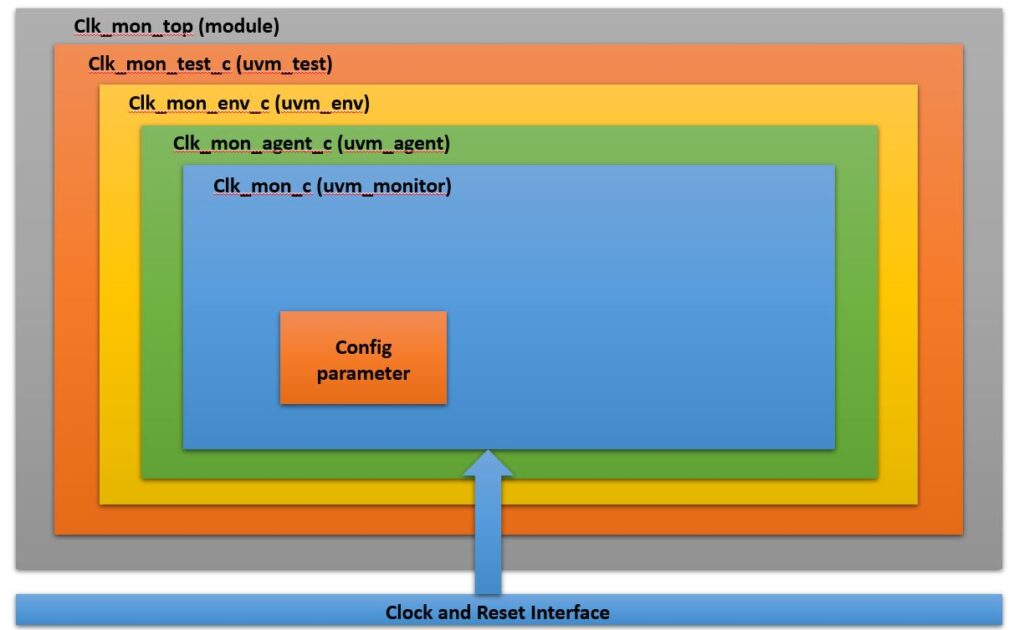
Configuration parameters are passed to the monitor from the environment or a test using the UVM config database (uvm_config_db set and get). This is how one reusable monitor adapts to each clock it watches. To see how the config database moves settings and virtual interfaces around, see passing a virtual interface through uvm_config_db.
Clock monitor configuration parameters
These user-programmable parameters control what the monitor expects and checks:
| Parameter (type) | Meaning |
|---|---|
| Enable/disable (bit) | Enable or disable the clock monitor on the fly. |
| Input frequency (real) | The frequency at which the clock is expected to run, in MHz. |
| Freq tolerance (real) | Allowed frequency tolerance, as a percentage. |
| High Period (real) | Expected high period of the clock, as a percentage. |
| Low Period (real) | Expected low period of the clock, as a percentage. |
| Switch Freq (real) | The frequency the clock should switch to, in MHz. |
| Switch high period (real) | High period of the clock after switching, as a percentage. |
| Switch low period (real) | Low period of the clock after switching, as a percentage. |
| Switch enable (bit) | Tells the monitor that a frequency switch is expected. |
| freq_all[] (real, dynamic array) | Dynamic array of allowed frequencies for a given clock, in MHz. |
| freq_expected (bit) | When set, the running frequency must be one of freq_all; when reset, this check is off. |
| dc value (bit) | Expected DC value of the clock at reset time. |
| switch_freq_tolerance (int) | How many clock cycles can be ignored while a switch is in progress (default is one). |
How the clock monitor works (flow)
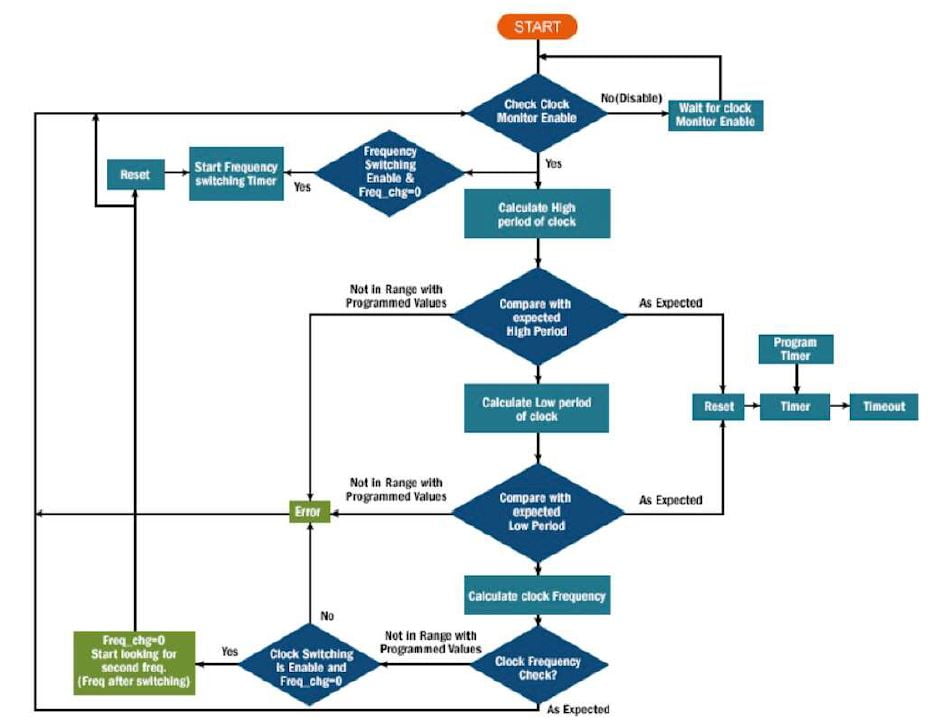
Once the enable signal is set, the monitor starts watching. It captures the high and low periods of the clock from the rising (posedge) and falling (negedge) edges, then compares them against the expected values.
- If the measured high and low periods fall outside the expected tolerance, the monitor raises a uvm_error.
- If neither a posedge nor a negedge is seen within the timeout period, the monitor raises a uvm_error for the timeout.
- For clock switching, the monitor first checks whether a switch was expected. If a switch happens when none was expected, it raises a uvm_error.
- If a switch was expected, the monitor ignores the first few cycles after the switch (set by switch_freq_tolerance), then checks the new high and low periods against the switched-frequency values.
- If the measured frequency is ever not in the allowed freq_all range, it raises a uvm_error.
- If a switch was expected but never happens, a timeout error is reported.
A worked example: a check inside the monitor
Here is a small, LRM-correct SystemVerilog style sketch of the period check the monitor runs. It measures the time between edges and compares it against the expected period with a tolerance. This is illustrative, not the full component.
// Measure a half period and check it against expected, within tolerance.
// exp_ns is the expected half period; tol_pct is the allowed percent error.
task automatic check_half_period(input real exp_ns, input real tol_pct);
  time t0, t1;
  real meas_ns, err_pct;
  @(posedge vif.clk);  t0 = $realtime;   // start of high
  @(negedge vif.clk);  t1 = $realtime;   // end of high
  meas_ns = (t1 - t0);
  err_pct = 100.0 * (meas_ns - exp_ns) / exp_ns;
  if (err_pct < -tol_pct || err_pct > tol_pct)
    `uvm_error("CLK_MON",
      $sformatf("High period %0.3f ns off by %0.2f%% (exp %0.3f ns)",
                meas_ns, err_pct, exp_ns))
  else
    `uvm_info("CLK_MON",
      $sformatf("High period %0.3f ns OK", meas_ns), UVM_HIGH)
endtask
A glitch check watches for two edges closer together than physically allowed, and a timeout uses a fork/join_any with a delay so that if no edge arrives in time, the monitor reports an error instead of hanging.
A full working UVM clock monitor
The sketch above shows one check. Here is a complete, reusable clock monitor that follows the block diagram and the configuration table on this page. It is made of five pieces that fit together: the virtual interface (clk_mon_if), a config object that carries every programmable parameter, the monitor itself (clk_mon_c, which extends uvm_monitor), the agent that holds it (clk_mon_agent_c), and the wiring in the environment that passes settings and the interface through uvm_config_db. Drop the agent into any uvm_env and it watches whichever clock you point it at.
1. The interface: two signals only
The block diagram connects the monitor to the design through clk_mon_if, which carries only the clock and its enable. Keeping it this small is what lets the same monitor plug onto any clock in the SoC.
// clk_mon_if.sv
// The virtual interface the monitor connects through.
// It carries just two signals, exactly as in the block diagram:
//   clk    -> the SoC clock under test
//   enable -> the SoC clock-enable signal
interface clk_mon_if;
  logic clk;
  logic enable;
endinterface : clk_mon_if
2. The config object: the whole parameter table in one place
Every row of the configuration table becomes one field here. The test or environment builds this object, sets the values it wants, and hands it to the monitor. Note freq_all is an IEEE 1800 dynamic array, so the list of allowed frequencies can be any length.
// clk_mon_cfg.sv
// One config object that carries every programmable parameter from the
// configuration table. The environment or test fills this in and passes
// it to the monitor through uvm_config_db, so one monitor fits any clock.
class clk_mon_cfg extends uvm_object;
  `uvm_object_utils(clk_mon_cfg)

  // --- enable / disable on the fly ---
  bit  mon_enable       = 1;      // enable or disable the monitor

  // --- steady-state expectation ---
  real in_freq_mhz      = 100.0;  // expected running frequency, MHz
  real freq_tol_pct     = 2.0;    // allowed frequency tolerance, percent
  real high_pct         = 50.0;   // expected high period, percent of cycle
  real low_pct          = 50.0;   // expected low  period, percent of cycle

  // --- on-the-fly switching ---
  bit  switch_enable    = 0;      // a frequency switch is expected
  real switch_freq_mhz  = 50.0;   // frequency to switch to, MHz
  real switch_high_pct  = 50.0;   // high period after switch, percent
  real switch_low_pct   = 50.0;   // low  period after switch, percent
  int  switch_freq_tol  = 1;      // cycles to ignore while a switch settles

  // --- allowed-frequency list and DC checks ---
  real freq_all[];                // dynamic array of allowed frequencies, MHz
  bit  freq_expected    = 0;      // if set, running freq must be in freq_all
  bit  dc_value         = 0;      // expected DC level of the clock at reset

  // --- timeout ---
  time edge_timeout     = 1us;    // max wait for the next edge before error

  function new(string name = "clk_mon_cfg");
    super.new(name);
  endfunction
endclass : clk_mon_cfg
3. The monitor: clk_mon_c extends uvm_monitor
This is the heart of the block diagram. It grabs its config and interface from uvm_config_db in the build phase, then loops in the run phase. When the monitor and the clock enable are both on it checks each period; when either is off it waits. A covergroup records the frequencies seen so a random test can prove every clock mode ran.
// clk_mon_c.sv
// The monitor. It extends uvm_monitor, takes its settings from clk_mon_cfg,
// and watches the clock through the virtual interface. It checks the high and
// low periods against tolerance, detects glitches and timeouts, handles an
// on-the-fly switch, and covers the frequencies it measures.
class clk_mon_c extends uvm_monitor;
  `uvm_component_utils(clk_mon_c)

  virtual clk_mon_if vif;   // set from the agent / config db
  clk_mon_cfg        cfg;   // all programmable parameters

  real meas_freq_mhz;       // last measured frequency, for coverage

  // Coverage of the frequencies actually seen, so constrained-random
  // tests can replace directed clock tests.
  covergroup freq_cg;
    option.per_instance = 1;
    FREQ : coverpoint meas_freq_mhz {
      bins low    = {[0:49]};
      bins mid    = {[50:199]};
      bins high   = {[200:1000]};
    }
  endgroup

  function new(string name, uvm_component parent);
    super.new(name, parent);
    freq_cg = new();
  endfunction

  function void build_phase(uvm_phase phase);
    super.build_phase(phase);
    // Get the config object; without it the monitor cannot run.
    if (!uvm_config_db#(clk_mon_cfg)::get(this, "", "cfg", cfg))
      `uvm_fatal("CLK_MON", "No clk_mon_cfg supplied via uvm_config_db")
    // Get the virtual interface (the agent usually forwards it).
    if (!uvm_config_db#(virtual clk_mon_if)::get(this, "", "vif", vif))
      `uvm_fatal("CLK_MON", "No clk_mon_if supplied via uvm_config_db")
  endfunction

  task run_phase(uvm_phase phase);
    // Wait until the monitor and the clock enable are both on.
    forever begin
      if (!cfg.mon_enable || !vif.enable) begin
        @(cfg.mon_enable or vif.enable);
        continue;
      end
      // While enabled, run the per-period check with a timeout guard.
      check_one_period();
    end
  endtask
endclass : clk_mon_c
4. The per-period check: period, duty cycle, glitch, timeout
This is the flow chart turned into code. It measures one full cycle inside a fork guarded by a timeout, so a stopped clock reports an error instead of hanging. It then flags a zero-time glitch, checks the high and low periods (the duty cycle) against tolerance, and confirms the measured frequency is in the allowed list. When switch_enable is set it compares against the switched-frequency targets instead of the steady ones.
// clk_mon_checks.sv  (methods of clk_mon_c)
// One full cycle measurement: high time, low time, period, frequency,
// duty cycle, glitch and timeout, plus the allowed-frequency check.
task clk_mon_c::check_one_period();
  time  t_rise, t_fall, t_next_rise;
  real  high_ns, low_ns, period_ns;
  real  exp_period_ns, exp_high_ns, exp_low_ns;
  real  in_freq, high_pct, low_pct;

  // Pick steady or switched targets depending on switch_enable.
  in_freq  = cfg.switch_enable ? cfg.switch_freq_mhz : cfg.in_freq_mhz;
  high_pct = cfg.switch_enable ? cfg.switch_high_pct : cfg.high_pct;
  low_pct  = cfg.switch_enable ? cfg.switch_low_pct  : cfg.low_pct;

  // 1 MHz => 1000 ns period. Convert once.
  exp_period_ns = 1000.0 / in_freq;
  exp_high_ns   = exp_period_ns * high_pct / 100.0;
  exp_low_ns    = exp_period_ns * low_pct  / 100.0;

  // --- capture one cycle, but never hang: fork a timeout ---
  fork : cycle_or_timeout
    begin
      @(posedge vif.clk); t_rise      = $realtime;
      @(negedge vif.clk); t_fall      = $realtime;
      @(posedge vif.clk); t_next_rise = $realtime;
    end
    begin
      #(cfg.edge_timeout);
      `uvm_error("CLK_MON",
        $sformatf("Timeout: no clock edge within %0t", cfg.edge_timeout))
      disable cycle_or_timeout;
      return;
    end
  join_any
  disable cycle_or_timeout;

  high_ns   = t_fall - t_rise;
  low_ns    = t_next_rise - t_fall;
  period_ns = t_next_rise - t_rise;

  // --- zero-time glitch: two edges at the same instant ---
  if (high_ns <= 0.0 || low_ns <= 0.0) begin
    `uvm_error("CLK_MON", "Glitch: two edges with zero time between them")
    return;
  end

  meas_freq_mhz = 1000.0 / period_ns;

  // --- high / low period (duty cycle) against tolerance ---
  check_pct("High", high_ns, exp_high_ns, cfg.freq_tol_pct);
  check_pct("Low",  low_ns,  exp_low_ns,  cfg.freq_tol_pct);

  // --- allowed-frequency list check ---
  if (cfg.freq_expected && !freq_in_list(meas_freq_mhz))
    `uvm_error("CLK_MON",
      $sformatf("Measured %0.2f MHz is not in the allowed list", meas_freq_mhz))

  freq_cg.sample();
endtask

// Compare a measured value against expected within a percent tolerance.
function void clk_mon_c::check_pct(string tag, real meas, real exp, real tol);
  real err_pct;
  err_pct = 100.0 * (meas - exp) / exp;
  if (err_pct < -tol || err_pct > tol)
    `uvm_error("CLK_MON",
      $sformatf("%s period %0.3f ns off by %0.2f%% (exp %0.3f ns)",
                tag, meas, err_pct, exp))
  else
    `uvm_info("CLK_MON",
      $sformatf("%s period %0.3f ns OK", tag, meas), UVM_HIGH)
endfunction

// Is the measured frequency one of the allowed values (within tolerance)?
function bit clk_mon_c::freq_in_list(real f);
  foreach (cfg.freq_all[i])
    if (f >= cfg.freq_all[i] * (1.0 - cfg.freq_tol_pct/100.0) &&
        f <= cfg.freq_all[i] * (1.0 + cfg.freq_tol_pct/100.0))
      return 1;
  return 0;
endfunction
5. The agent and how the environment wires it up
The agent is the box that sits between the environment and the monitor in the block diagram. Because a clock monitor only watches, the agent is passive: no driver, no sequencer. It receives the config object and the virtual interface from the environment and forwards both to the monitor. The environment fills in the config for each clock it wants watched and drops the agent in.
// clk_mon_agent_c.sv
// The agent holds the monitor and forwards the interface and config down.
// A clock monitor is passive, so there is no driver or sequencer here.
class clk_mon_agent_c extends uvm_agent;
  `uvm_component_utils(clk_mon_agent_c)

  clk_mon_c          mon;
  clk_mon_cfg        cfg;
  virtual clk_mon_if vif;

  function new(string name, uvm_component parent);
    super.new(name, parent);
  endfunction

  function void build_phase(uvm_phase phase);
    super.build_phase(phase);
    // Get cfg and vif that the env set for this agent, then pass them to
    // the monitor so the monitor's own get() calls succeed.
    if (!uvm_config_db#(clk_mon_cfg)::get(this, "", "cfg", cfg))
      `uvm_fatal("CLK_AGT", "No clk_mon_cfg for agent")
    if (!uvm_config_db#(virtual clk_mon_if)::get(this, "", "vif", vif))
      `uvm_fatal("CLK_AGT", "No clk_mon_if for agent")

    uvm_config_db#(clk_mon_cfg)::set(this, "mon", "cfg", cfg);
    uvm_config_db#(virtual clk_mon_if)::set(this, "mon", "vif", vif);

    mon = clk_mon_c::type_id::create("mon", this);
  endfunction
endclass : clk_mon_agent_c
// In the environment: build the config, set the interface, add the agent.
class soc_env extends uvm_env;
`uvm_component_utils(soc_env)
clk_mon_agent_c clk_agent;
clk_mon_cfg clk_cfg;
function new(string name, uvm_component parent);
super.new(name, parent);
endfunction
function void build_phase(uvm_phase phase);
super.build_phase(phase);
// 1. Describe the clock this monitor should expect.
clk_cfg = clk_mon_cfg::type_id::create("clk_cfg");
clk_cfg.in_freq_mhz = 100.0; // expect 100 MHz
clk_cfg.freq_tol_pct = 2.0; // within 2 percent
clk_cfg.high_pct = 50.0; // 50 percent duty
clk_cfg.low_pct = 50.0;
clk_cfg.freq_expected = 1;
clk_cfg.freq_all = '{50.0, 100.0, 200.0}; // allowed modes
// 2. Hand the config and the interface to the agent.
uvm_config_db#(clk_mon_cfg)::set(this, "clk_agent", "cfg", clk_cfg);
// vif is placed by the top module; forward it to the agent.
// (top does: uvm_config_db#(virtual clk_mon_if)::set(null,"*","vif",dut_if);)
// 3. Build the agent.
clk_agent = clk_mon_agent_c::type_id::create("clk_agent", this);
endfunction
endclass : soc_envTo watch a second clock, build another clk_mon_cfg with different values, add a second clk_mon_agent_c, and point it at that clock. Nothing inside the monitor changes. That is the reuse the block diagram is built for: one component, many clocks, all driven from the config database.
Honesty note: this code describes intended behaviour from a SystemVerilog and UVM LRM read (IEEE 1800 and 1800.2). It has not been captured from a simulator run, and exact timing depends on your clock, time unit, and tool. Confirm it on your own simulator or on EDA Playground before relying on it.
Advantages of a clock monitor
- Reusable across projects, which saves development time and effort.
- Accurate every cycle, which cuts the human error of manual waveform checking.
- Automatic glitch detection, including the zero-time glitch.
- Wide frequency range, not limited by lab equipment.
- Detects clock-frequency switching and checks the new frequency.
- Automated checking with custom alerts, so failures are reported clearly.
- Measures duty cycle and covers the frequencies seen, so random tests can replace directed clock tests.
A real project example
One team used this clock monitor to verify an SoC with several wireless blocks (Bluetooth, GPS, FM) and serial protocols (UART, IIC, SPI). Each block ran at a different frequency and switched clocks on the fly during low-power mode. Using the clock monitor there saved time over the traditional directed-test approach.
The coverage part of the monitor adds a further gain: it records which frequencies were measured, so instead of directed clock tests you can use SystemVerilog constrained-random tests to exercise the clocks. That saves time and needs less maintenance. Because the monitor is already built in UVM, it drops into any existing UVM environment, so a new project can verify the clock block from day one. On this project it saved about three weeks of effort given the complexity involved.
Common mistakes when verifying clocks
- Checking only the steady frequency and forgetting on-the-fly switching and the settling cycles right after a switch.
- Missing the zero-time glitch because a manual check samples too slowly.
- No timeout, so a stopped clock hangs the test instead of reporting an error.
- Ignoring duty cycle; a correct frequency can still have a bad high/low ratio.
- Hard-coding one frequency instead of passing values through the config database, which breaks reuse.
- Not covering the measured frequencies, so you cannot prove every clock mode was exercised.
Expected output, in plain words
When the clock behaves, the monitor stays quiet and its coverage fills in as each frequency is seen. When a period drifts outside tolerance, a glitch appears, an unexpected switch happens, or an edge goes missing, the monitor raises a uvm_error with a clear message. The code above describes intended behaviour from a SystemVerilog and UVM read, not a captured simulator run, and exact timings depend on your clock and time unit, so confirm on your own simulator or on EDA Playground. This clock-monitor concept comes from an EDN paper by engineers at eInfochips.
Frequently asked questions
What is a clock monitor in SoC verification?
A clock monitor is a reusable SystemVerilog/UVM component that watches a clock signal and automatically checks its frequency, duty cycle, and on-the-fly switching, while detecting glitches and timeouts and raising a uvm_error when something is wrong.
What does a clock monitor check?
It checks frequency against a tolerance, detects glitches including the zero-time glitch, verifies on-the-fly frequency switching, raises alerts on timeouts, measures duty cycle, checks the DC value when the clock is stopped, and covers the frequencies it measures.
How is a clock monitor built in UVM?
The monitor clk_mon_c extends uvm_monitor and sits inside a uvm_agent (clk_mon_agent_c). It connects to the clock through a virtual interface with two signals, clk and enable, and the agent can be placed inside any uvm_env.
How are clock monitor settings passed in?
Configuration parameters such as expected frequency, tolerance, high and low periods, and the allowed frequency list are passed from the environment or test using the UVM config database (uvm_config_db set and get).
How does a clock monitor handle on-the-fly frequency switching?
It first checks whether a switch was expected. If a switch happens unexpectedly it raises an error. If a switch was expected, it ignores the first few settling cycles, then checks the new high and low periods against the switched-frequency values.
Why use a clock monitor instead of directed tests?
Because it measures accurately every cycle, detects glitches automatically, works over a wide frequency range, and covers the frequencies seen. That lets you replace directed clock tests with constrained-random tests, saving time and maintenance.
Can the same clock monitor be reused on other projects?
Yes. Because it is a self-contained UVM component driven by config parameters, you can plug it into any existing UVM environment and verify the clock block from day one, without redeveloping it.
What errors does a clock monitor report?
It reports a uvm_error when a period is outside tolerance, when a glitch is detected, when an unexpected switch occurs, when the frequency is outside the allowed list, and a timeout error when an expected edge or switch never arrives.


Hello Hardik
Gone through your clock monitor concept
It’s really good. Is it implemented in real time project?
Also is it restricted only verification Domain?
Kiran
Hi Kiran,
Yeah, it’s implemented in real-time projects. We are using it as one of the Verification components.
Regards,
Hardik
Hi Hardik,
How can we detect the zero time glitch in monitor ?!if possible ,sample code ?!
Hi Hardik,
May be a dumb question,
What do we achieve extra with a monitor which we can not do with a Property (Assert/Cover),where we can consider all the parameters listed by you.
Hi Senthil,
I believe no question is dumb it’s all about how curious you are to know things better. We can achieve many of the checks using assertions but for more reusability, we can think of a clock monitor component that has the following advantages.
1. Reusable Module saves time and effort
2. Measures accurate Clock on every clock cycle, reduced possibility of human error
3. Automatically detects the Glitch including the zero time glitch on Clock
4. Wide frequency measurement range, not limited by equipment
5. Detects switching of clock frequency
6. Automates checking, generates custom alerts
7. Measures duty-cycle of the clock
Thank you
What is the rationale behind making it a uvm_mon? Why can’t it just be a uvm_object? I don’t see any component-like behavior that requires it to be a uvm monitor.
Thanks!
Bhaskar