
UVM Scoreboard Mismatch: How to Find the Real Cause
In short: A UVM scoreboard mismatch means two things disagree: what the design produced and what your bench expected. It does not tell you which one is wrong. In practice the cause is one of six: a design bug, a reference model bug, a monitor bug, an ordering mismatch, a sampling (timing) bug, or a scoreboard that was not flushed on reset. This guide gives a 5-minute triage method to tell them apart, and shows five of them on one small bench with real VCS logs. The surprise: only one of the five was a design bug, and a design bug and a model bug produced the same 33-line log.
A red SB_MISMATCH line is the most common failure you will see in a UVM regression. It is also the most misread. The first instinct is “the design is broken”. Often it is not.
The analogy: a restaurant ticket rail
Think of a busy kitchen. Orders come in on tickets. The expediter at the pass checks every plate against its ticket before it goes out.
- The kitchen is the design (DUT).
- The ticket is what your reference model predicts.
- The waiter who carries plates to the pass is the output monitor.
- The expediter is the scoreboard.
When the expediter shouts “wrong plate”, the cook may have made a mistake. But the ticket might be written wrong, the waiter might have grabbed the wrong plate, or the plates might just be coming out in a different order than the tickets. A good expediter checks which one before blaming the cook.
That is the whole job of debugging a scoreboard mismatch.
How a scoreboard decides “match” or “mismatch”
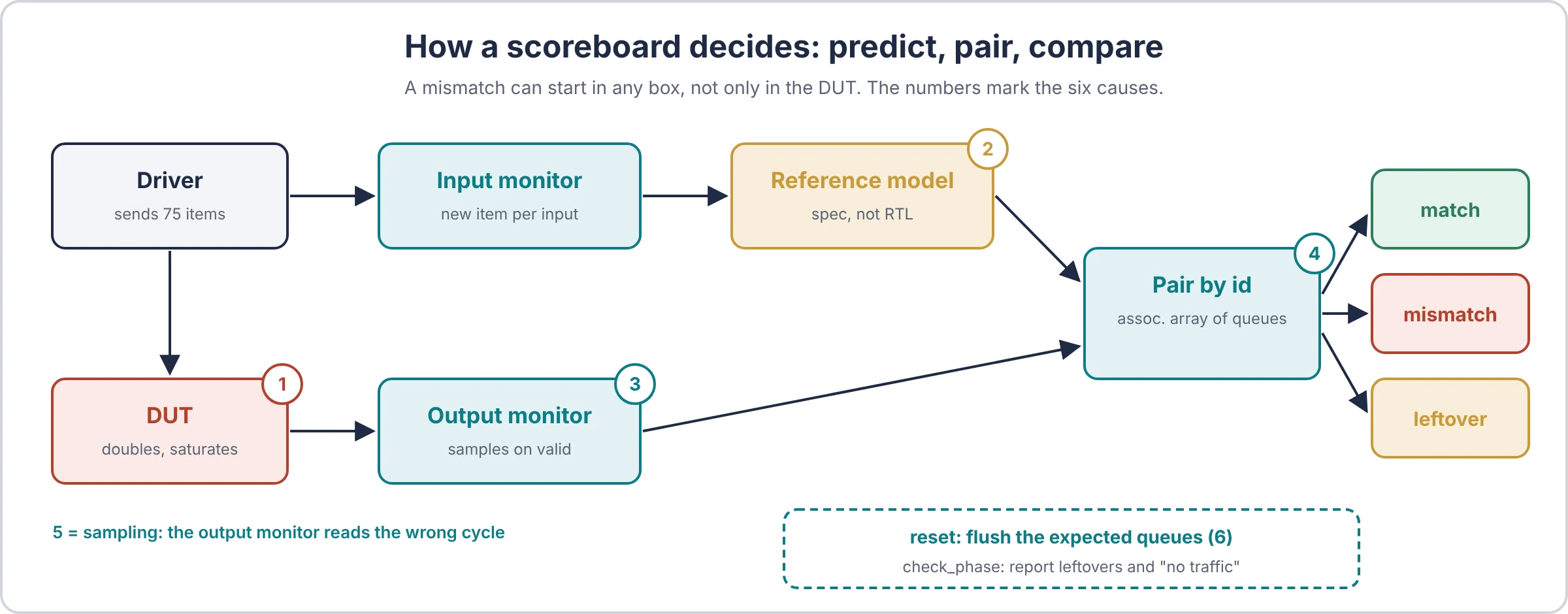
Every scoreboard does the same three steps, whatever it looks like inside:
- Predict. An input monitor sees each transaction going in. A reference model turns it into the expected output.
- Wait and pair. An output monitor sees each transaction coming out. The scoreboard pairs it with one expected item.
- Compare. If the pair differs, it raises
uvm_error. At the end of the test, anything left unpaired is also an error.
A mismatch can come from any of those three steps, not only from the design. That is why the next section has six causes, not one.
In-order or out-of-order?
The pairing step is where most scoreboards get it wrong.
| Design behaviour | How to pair | Data structure |
|---|---|---|
| Outputs always leave in input order | Oldest expected item first | One queue, pop_front() |
| Outputs can overtake each other | By a tag the design carries (id, address, tag) | Associative array of queues, keyed by the tag |
| No tag, and order can change | Search for any expected item that matches | A list you search, then delete the match (slower, and weaker as a check) |
- Analogy: a single-file queue at a bank counter can be checked in order. A restaurant cannot: a salad comes out before the steak that was ordered first. You match plates by table number, not by arrival.
- Rule of thumb: read the spec for one sentence: “responses are returned in order”. If it is not there, assume they are not.
The UVM library ships uvm_in_order_comparator for the first row. Out-of-order designs usually need a small scoreboard of your own, like the one in the demo below.
The six causes of a scoreboard mismatch
| # | Cause | Who is wrong | Restaurant version | The clue in the log |
|---|---|---|---|---|
| 1 | Design bug | The DUT | The cook made the wrong dish | Mismatches follow a data pattern the spec describes (a range, a corner value) |
| 2 | Reference model bug | Your model | The ticket was written wrong | Exactly the same log as #1. Only the spec can tell them apart |
| 3 | Monitor bug | Your output monitor | The waiter grabbed the wrong plate | Odd values: zeros, repeats, ids that were never sent, items missing |
| 4 | Ordering mismatch | Your pairing | Plates checked against tickets in the wrong order | The data is right but belongs to a different id; errors appear only when items overtake |
| 5 | Sampling (timing) bug | Monitor or driver timing | The plate was grabbed before it was ready, or after it left | Off by one: you see the value of the cycle before or after |
| 6 | No flush on reset | Your scoreboard | The kitchen restarted but old tickets stayed on the rail | An expected item sent before the last reset; errors start when its id is reused, plus “never came out” leftovers at the end |
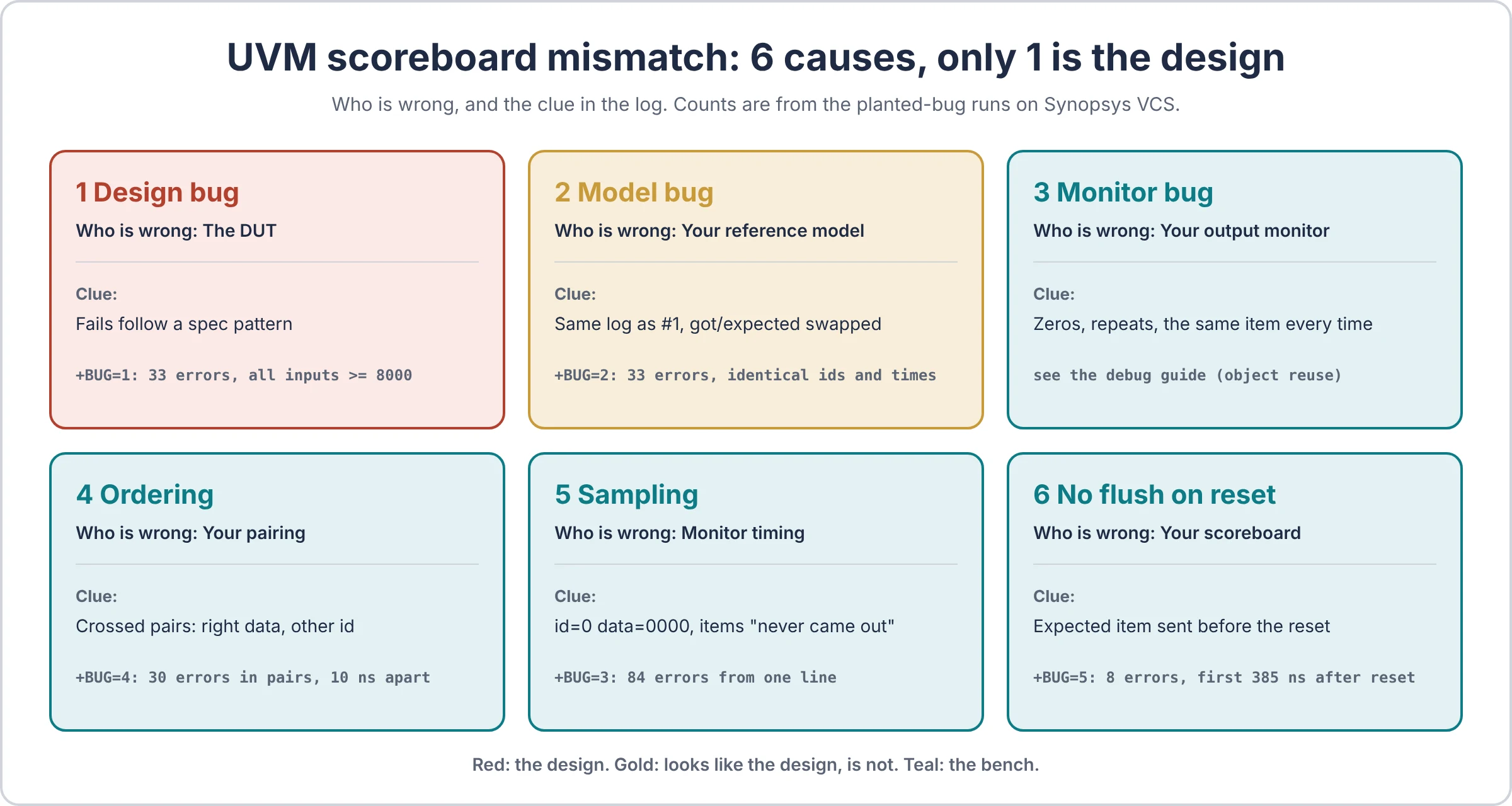
Three of the six are bench bugs, and one (#2) looks identical to a design bug. So the first question in any mismatch is not “what is wrong with the design?” It is “who is wrong: the design, the model, or the bench?”
What each one looks like
- Design bug. The model is right and the design breaks the spec. This is the bug you are paid to find. Fix: file it with the input, expected and actual values and the time.
- Reference model bug. The model was written from a misread spec, or copied from the RTL (and so copied its bug). Fix: re-read the spec line by line against the model. Never derive the model from the RTL.
- Monitor bug. The monitor reuses one object for every transaction, samples the wrong signal, or misses beats. Fix: create a new object per transaction, and compare the monitor’s view against the waveform for one item.
- Ordering mismatch. The design is allowed to reorder, but the scoreboard pairs in arrival order. Fix: pair by the tag the design carries.
- Sampling bug. The monitor reads signals one cycle early or late, or races the design without a clocking block. Fix: sample through a clocking block, on the cycle the protocol says the data is valid.
- No flush on reset. The design drops in-flight items on reset; the scoreboard keeps waiting for them. Fix: watch reset in the scoreboard and clear the expected queues.
A 5-minute triage before you open a waveform
Five questions, in order. Most mismatches are classified by question 3.
- Read the first mismatch only. Later errors are often echoes of the first one. Note the time, the id, the expected and the actual value.
- Is the actual value plausible? All zeros, X, a repeat of the previous item, or an id that was never sent points at the monitor (#3) or sampling (#5), not the design.
- Is the actual value right for a different item? If the data matches another input’s expected value, it is an ordering problem (#4) or a stale entry left over from a reset (#6).
- Does the spec agree with the model? Work out the expected value by hand from the spec for that one input. If the spec agrees with the design, the model is wrong (#2). If it agrees with the model, the design is wrong (#1).
- Only now, open the waveform at the time of the first mismatch, and check that the monitor’s values match the signals on that clock edge.
- Analogy: a doctor does not order a scan before asking where it hurts. The scan is step 5, not step 1.
- Tip: print enough in the error message to answer questions 2 to 4 without a waveform: id, expected, actual, the input that produced it, and when it was sent. The demo’s scoreboard does exactly this.
The practical verification debug guide covers the same idea for every kind of failure, not only scoreboards.
One bench, five planted causes, real VCS logs
To show what each cause looks like in a real log, here is one small UVM bench with five of the six causes planted behind +BUG=N. (The sixth, a monitor that reuses one object, is shown with its log in the debug guide.)
The design: dbl
- Doubles a 16-bit value, saturating at
16'hFFFF. - Every item carries a 4-bit id.
- Priority items come out after 1 cycle, normal items after 4, so a priority item can overtake a normal one. The spec allows this; outputs must be matched by id.
- Reset drops every item still inside.
The bench
- Driver, input monitor, output monitor and scoreboard, all through clocking blocks.
- The scoreboard pairs by id (an associative array of queues), flushes on reset, and reports leftovers and “no traffic” at the end.
- The test sends 6 corner values (
0000,0001,7FFE,7FFF,8000,FFFF), then 10 normal items with a reset in the middle, then 60 random items.
+BUG | Planted cause | Where |
|---|---|---|
| 0 | none | |
| 1 | Design bug: wraps instead of saturating | DUT |
| 2 | Model bug: model wraps, design is correct | Scoreboard model |
| 3 | Sampling bug: output monitor samples one cycle late | Output monitor |
| 4 | Ordering: pairs in input order on a design that reorders | Scoreboard |
| 5 | No flush on reset | Scoreboard |
All runs: Synopsys VCS X-2025.06-SP1, UVM 1.2, same seed, 75 items per run. Logs are trimmed to the first errors and the summary line; nothing else is changed.
+BUG | UVM_ERROR | matched | mismatched | unexpected | flushed | leftover |
|---|---|---|---|---|---|---|
| 0 clean | 0 | 73 | 0 | 0 | 2 | 0 |
| 1 design bug | 33 | 40 | 33 | 0 | 2 | 0 |
| 2 model bug | 33 | 40 | 33 | 0 | 2 | 0 |
| 3 late monitor | 84 | 14 | 9 | 30 | 7 | 45 |
| 4 in-order compare | 30 | 43 | 30 | 0 | 2 | 0 |
| 5 no flush on reset | 8 | 67 | 6 | 0 | 0 | 2 |
In every run, matched + mismatched + flushed + leftover = 75. Nothing went missing between the monitors without being reported.
+BUG=0: the clean run
UVM_INFO testbench.sv(284) @ 0: uvm_test_top [TEST] planted bug: 0
UVM_INFO testbench.sv(242) @ 250: uvm_test_top.env.sb [SB] reset seen, flushing 2 in-flight items
UVM_INFO testbench.sv(254) @ 1685: uvm_test_top.env.sb [SB] sent=75 matched=73 mismatched=0 unexpected=0 flushed=2 leftover=0
UVM_ERROR :    0
The reset caught 2 normal items inside the design, and the scoreboard dropped them too. Zero errors.
+BUG=1 and +BUG=2: the same log, mirrored
+BUG=1 (design wraps instead of saturating)
UVM_ERROR testbench.sv(228) @ 155: uvm_test_top.env.sb [SB_MISMATCH] got id=4 data=0000, expected id=4 data=ffff (input data=8000 pri=1 sent @135)
UVM_ERROR testbench.sv(228) @ 175: uvm_test_top.env.sb [SB_MISMATCH] got id=5 data=fffe, expected id=5 data=ffff (input data=ffff pri=1 sent @155)
UVM_ERROR testbench.sv(228) @ 225: uvm_test_top.env.sb [SB_MISMATCH] got id=6 data=3504, expected id=6 data=ffff (input data=9a82 pri=0 sent @175)
...
UVM_INFO testbench.sv(254) @ 1685: uvm_test_top.env.sb [SB] sent=75 matched=40 mismatched=33 unexpected=0 flushed=2 leftover=0

+BUG=2 (model wraps, design is correct)
UVM_ERROR testbench.sv(228) @ 155: uvm_test_top.env.sb [SB_MISMATCH] got id=4 data=ffff, expected id=4 data=0000 (input data=8000 pri=1 sent @135)
UVM_ERROR testbench.sv(228) @ 175: uvm_test_top.env.sb [SB_MISMATCH] got id=5 data=ffff, expected id=5 data=fffe (input data=ffff pri=1 sent @155)
UVM_ERROR testbench.sv(228) @ 225: uvm_test_top.env.sb [SB_MISMATCH] got id=6 data=ffff, expected id=6 data=3504 (input data=9a82 pri=0 sent @175)
...
UVM_INFO testbench.sv(254) @ 1685: uvm_test_top.env.sb [SB] sent=75 matched=40 mismatched=33 unexpected=0 flushed=2 leftover=0- Same ids, same times, same count (33). Only “got” and “expected” swap places. A tool that counts errors cannot tell these two runs apart.
- The pattern is clear, though: every failing input is
8000or above. That points at the saturation rule. - Triage question 4 decides it. The spec says
8000doubled saturates toFFFF. In run 1 the design gave0000, so the design is wrong. In run 2 the design gaveFFFFand the model said0000, so the model is wrong. - Analogy: two restaurants send back the same plate with the same complaint. In one the cook burned it; in the other the ticket asked for it raw. You only know which by reading the menu.
- Note the corner values. The very first error is the
8000corner from the directed sequence, at 155 ns. Random data found the bug too, but the corner found it first.
+BUG=3: the monitor samples one cycle late
UVM_ERROR testbench.sv(219) @ 135: uvm_test_top.env.sb [SB_UNEXPECTED] id=0 data=0000 arrived, no input with this id is waiting
UVM_ERROR testbench.sv(219) @ 235: uvm_test_top.env.sb [SB_UNEXPECTED] id=0 data=0000 arrived, no input with this id is waiting
UVM_INFO testbench.sv(242) @ 250: uvm_test_top.env.sb [SB] reset seen, flushing 7 in-flight items
...
UVM_ERROR testbench.sv(228) @ 405: uvm_test_top.env.sb [SB_MISMATCH] got id=0 data=0000, expected id=0 data=b6ac (input data=5b56 pri=0 sent @405)
UVM_ERROR testbench.sv(219) @ 1095: uvm_test_top.env.sb [SB_UNEXPECTED] id=0 data=94cc arrived, no input with this id is waiting
...
UVM_ERROR testbench.sv(251) @ 1685: uvm_test_top.env.sb [SB_LEFTOVER] expected id=15 pri=0 data=18b7 never came out (sent @385)
...
UVM_INFO testbench.sv(254) @ 1685: uvm_test_top.env.sb [SB] sent=75 matched=14 mismatched=9 unexpected=30 flushed=7 leftover=45- 30 of the errors say
id=0 data=0000. The monitor read the bus one cycle after the item left, when the design drives zeros. That is triage question 2: the value is not plausible. - 45 items “never came out”. They did come out. The monitor was looking at the wrong cycle and missed them.
- The reset flushed 7, not 2. Items the monitor missed were still waiting when reset arrived.
- 84 errors from one wrong line in the monitor. This is the noisiest log of the six and the cause is the smallest. Read the first error, not the count.
In a two-clock bench this gets harder: async FIFO verification part 1 shows a monitor that samples one edge late and prints exactly the same first errors as a real design bug.
+BUG=4: in-order compare on a design that reorders
UVM_ERROR testbench.sv(228) @ 155: uvm_test_top.env.sb [SB_MISMATCH] got id=4 data=ffff, expected id=3 data=fffe (input data=7fff pri=0 sent @115)
UVM_ERROR testbench.sv(228) @ 165: uvm_test_top.env.sb [SB_MISMATCH] got id=3 data=fffe, expected id=4 data=ffff (input data=8000 pri=1 sent @135)
UVM_INFO testbench.sv(242) @ 250: uvm_test_top.env.sb [SB] reset seen, flushing 2 in-flight items
UVM_ERROR testbench.sv(228) @ 445: uvm_test_top.env.sb [SB_MISMATCH] got id=1 data=f996, expected id=0 data=b6ac (input data=5b56 pri=0 sent @405)
UVM_ERROR testbench.sv(228) @ 455: uvm_test_top.env.sb [SB_MISMATCH] got id=0 data=b6ac, expected id=1 data=f996 (input data=7ccb pri=1 sent @425)
...
UVM_INFO testbench.sv(254) @ 1685: uvm_test_top.env.sb [SB] sent=75 matched=43 mismatched=30 unexpected=0 flushed=2 leftover=0- The errors come in pairs, 10 ns apart. “Got 4, expected 3”, then “got 3, expected 4”. A priority item overtook a normal one, and the scoreboard paired them crosswise.
- Every “got” value is correct for the other id. That is triage question 3. The design is fine; the pairing is wrong.
- Some pairs even show the same data (
ffffagainstffff) and still fail, because the ids differ. - Analogy: the salad came out before the steak. Both plates are right. The expediter was reading the tickets in the wrong order.
+BUG=5: no flush on reset
UVM_INFO testbench.sv(241) @ 250: uvm_test_top.env.sb [SB] reset seen, 2 items still expected (not flushed)
UVM_ERROR testbench.sv(230) @ 635: uvm_test_top.env.sb [SB_MISMATCH] got id=9 data=85c2, expected id=9 data=ffff (input data=fa57 pri=0 sent @235)
UVM_ERROR testbench.sv(230) @ 925: uvm_test_top.env.sb [SB_MISMATCH] got id=9 data=f488, expected id=9 data=85c2 (input data=42e1 pri=0 sent @585)
UVM_ERROR testbench.sv(230) @ 935: uvm_test_top.env.sb [SB_MISMATCH] got id=8 data=aa5e, expected id=8 data=ffff (input data=fca4 pri=0 sent @565)
...
UVM_ERROR testbench.sv(253) @ 1685: uvm_test_top.env.sb [SB_LEFTOVER] expected id=8 pri=0 data=88d6 never came out (sent @1525)
UVM_ERROR testbench.sv(253) @ 1685: uvm_test_top.env.sb [SB_LEFTOVER] expected id=9 pri=0 data=eb9a never came out (sent @1545)
UVM_INFO testbench.sv(256) @ 1685: uvm_test_top.env.sb [SB] sent=75 matched=67 mismatched=6 unexpected=0 flushed=0 leftover=2- The first error is 385 ns after the reset, not at it. The two stale entries (ids 8 and 9) sat quietly until the 4-bit id counter wrapped and used 8 and 9 again.
- Look at the “sent” time in the first error: 235 ns. That is before the reset at 250 ns. An expected item older than the last reset is the fingerprint of a missing flush.
- Each stale entry shifts every later item with the same id by one. The error at 925 ns expects
85c2, which is exactly what the design gave at 635 ns. The chain only ends at the test’s end, as 2 leftovers, one per item not flushed. - Only 8 errors. The quietest log here, and the easiest to wave away as noise. In a longer test with more id reuse, it would grow.
What the six runs teach
- The count of errors says little about the cause. 84 errors came from one line in a monitor; 8 came from a missing flush; 33 came from either the design or the model.
- The first error, printed with its input and send time, classified every run using only triage questions 2 to 4. None of them needed a waveform.
- Two of the five planted causes were in the scoreboard itself, one in the monitor and one in the model. Only one of the five was a design bug.
Run it yourself
The whole bench is one file, sb_mismatch_demo.sv: design, interface, UVM environment and test, with all five planted causes.
vcs -full64 -sverilog -ntb_opts uvm-1.2 sb_mismatch_demo.sv -R +BUG=0Then +BUG=1 to +BUG=5. On EDA Playground, put +BUG=N in Run Options, not Compile Options; if the setting does not reach the run, compile with +define+BUG=N instead. The first line of every log prints the planted bug, so you can check.
Try the triage before reading the logs above: run one bug, read only the first error, and name the cause.
Write a scoreboard that helps you debug it
The best time to debug a mismatch is when you write the scoreboard. Four habits make the error message do half the triage for you. All four are in the demo, shown here without the +BUG switches.
1. Pair by tag, and say so when nothing is waiting
function void write_out(dbl_item a);
  dbl_item e;
  if (!by_id.exists(a.id) || by_id[a.id].size() == 0) begin
    unexpected++;
    `uvm_error("SB_UNEXPECTED", $sformatf("id=%0d data=%h arrived, no input with this id is waiting", a.id, a.data))
    return;
  end
  e = by_id[a.id].pop_front();
  foreach (in_order[i]) if (in_order[i] == e) begin in_order.delete(i); break; end
  if (a.data == model(e.data)) matched++;
  else begin
    mismatched++;
    `uvm_error("SB_MISMATCH", $sformatf("got id=%0d data=%h, expected id=%0d data=%h (input data=%h pri=%0d sent @%0t)",
               a.id, a.data, e.id, model(e.data), e.data, e.pri, e.t_in))
  end
endfunctionby_idisdbl_item by_id[int][$]: one queue per id, so a repeated id still pairs oldest-first.in_orderkeeps the same items in input order, for the reset flush and the end-of-test report.- The message carries the input value and the time it was sent. That answers triage questions 2 to 4 without a waveform.
- Analogy: a plate label that says the table, the dish and when it was ordered, not just “wrong”.
2. Flush on reset
task run_phase(uvm_phase phase);
  forever begin
    @(negedge vif.rst_n);
    if (in_order.size() == 0) continue;
    `uvm_info("SB", $sformatf("reset seen, flushing %0d in-flight items", in_order.size()), UVM_LOW)
    flushed += in_order.size();
    by_id.delete(); in_order.delete();
  end
endtask
Log the number you flushed. A flush of 0 on every reset means your reset test never had anything in flight, which is a coverage hole of its own.
3. Check what is left at the end
function void check_phase(uvm_phase phase);
  if (sent == 0) `uvm_error("SB_NOTRAFFIC", "no inputs were observed")
  foreach (in_order[i])
    `uvm_error("SB_LEFTOVER", $sformatf("expected %s never came out (sent @%0t)",
               in_order[i].convert2string(), in_order[i].t_in))
endfunction
Without this, a design that drops items passes: nothing came out, so nothing mismatched. The “no traffic” check stops a bench that sends nothing from passing too.
4. Print one summary line
[SB] sent=75 matched=73 mismatched=0 unexpected=0 flushed=2 leftover=0The clean run, on VCS. sent must equal matched + mismatched + flushed + leftover. If it does not, an item went missing between the monitors, and that is a bench bug.
Common mistakes, from real forum threads
These come up again and again on Verification Academy and the Accellera forums. Thread links are in the references.
1. “My analysis FIFO is full of the same item”
- What happens: the monitor creates one object, then changes and writes it again for every transaction. Every entry in the scoreboard is the same handle, so all of them show the last value.
- Fix 1: create a new object for every transaction inside the monitor loop.
- Fix 2: if you do not own the monitor,
clone()the item in the scoreboard’swrite()before storing it. - Clue: every error prints the same data. Sixteen different transfers cannot look identical.
2. In-order compare on a design that reorders
- What happens: the scoreboard pops the oldest expected item for every output. It works until one item overtakes another, then every following compare is off.
- Fix 1: pair by the id or tag the design carries, with an associative array of queues.
- Fix 2: if there is no tag, search the expected list for a match and delete it. Weaker, but honest.
- Fix 3: ask the designers for a debug tag on the interface. It is cheap in RTL and saves weeks.
3. Reset in the middle of the test
- What happens: the design drops in-flight items; the scoreboard still waits for them. Errors start later, when the same id or address is used again, which makes them easy to blame on something else.
- Fix 1: watch reset inside the scoreboard and clear the expected queues.
- Fix 2: if you use the built-in comparators, check that the flush really empties their FIFOs. Several forum threads report that
flush()onuvm_in_order_comparatordoes not. - Fix 3: log how many items you flushed, so a reset test that flushes 0 is visible.
4. The monitor sees values a cycle early or late
- What happens: the monitor samples without a clocking block, or waits an extra clock “to be safe”. It reads the previous or the next beat.
- Fix 1: sample through a clocking block with an input skew, on the exact cycle the protocol marks data valid.
- Fix 2: keep latency out of the monitor. The monitor reports what is on the wires now; the scoreboard knows about latency.
- Clue: off-by-one values, zeros, or items that seem to vanish.
5. The test ends with items still in flight
- What happens: the sequence finishes, objections drop, and the test ends while the design is still working. The last items are never checked, and the log is green.
- Fix 1: add a drain time, or let the scoreboard hold an objection while its queues are not empty.
- Fix 2: report leftovers in
check_phase, so an early end is an error, not a pass.
6. The reference model was copied from the RTL
- What happens: the model has the same bug as the design, so they agree, and the bug passes. This one is not a forum thread; it is a quiet classic.
- Fix 1: write the model from the spec, line by line, never from the RTL.
- Fix 2: have someone other than the RTL author write or review it.
7. compare() fails on fields that should not match
- What happens: the item has timestamps, ids from the driver, or debug fields.
compare()checks all of them, and two correct items “mismatch”. - Fix 1: mark those fields
UVM_NOCOMPARE, or write your owndo_compare(). - Fix 2: compare only the fields the spec defines, and print them.
How AI helps with mismatches (and where it does not)
- Classifying the first error. Paste the first mismatch line, the spec rule and your model function, and ask: which of the six causes fits, and why? It is fast at questions 2 to 4 of the triage. It cannot see your waveform, so question 5 stays yours.
- Bucketing a regression. Hundreds of mismatch lines often have two or three causes. The bucketing script in the debug guide groups them; an AI can then summarise each bucket.
- Drafting the scoreboard. In our AI testbench experiment, the AI’s first-draft scoreboard paired, counted and reported “no traffic” on its own. It still needed a human to check that the model matched the spec.
- Where it does not help: deciding whether the spec or the model is right (#1 vs #2). That needs the spec author’s intent, and sometimes a meeting.
More on the method in AI in ASIC verification.
FAQ
What does a UVM scoreboard mismatch mean? The design’s output and the bench’s expected value disagree for one transaction. It does not say which side is wrong: the design, the reference model, a monitor, the pairing, the sampling, or a missed reset.
How do I know if it is a design bug or a testbench bug? Work out the expected value by hand from the spec for the first mismatching input. If the spec agrees with the model, it is a design bug. If the spec agrees with the design, fix the model. If the actual value is zero, a repeat or belongs to another id, look at the monitor and the pairing first.
How do I handle out-of-order transactions in a scoreboard? Pair by a tag the design carries, using an associative array of queues keyed by that tag. Pop the oldest entry for that tag, so repeated tags still pair correctly.
Should the scoreboard flush on reset? Yes, if the design drops in-flight work on reset. Watch reset inside the scoreboard, clear the expected queues, and log how many items you flushed.
Why does my scoreboard pass when the design drops packets? Nothing came out, so nothing mismatched. Report leftover expected items in check_phase, and add a “no traffic” check.
Should I use uvm_in_order_comparator? For designs that never reorder, it is a quick start. For designs that reorder, or need reset handling and clear error messages, a small scoreboard of your own is usually easier to trust.
References
- Accellera, UVM 1.2 Class Reference:
uvm_in_order_comparator,uvm_analysis_imp,uvm_object::compare. - Verification Academy forums: Duplicate items in uvm_tlm_analysis_fifo used in scoreboard; Analysis FIFO contents overwritten during consecutive valid transactions.
- Verification Academy forums: Out of order in driver and scoreboard; Scoreboard design for packets arriving OOO from the DUT.
- Verification Academy forums: Handling on the fly reset in scoreboard; Software reset in the middle of the test, clearing all scoreboards; Flush function of uvm_in_order_class_comparator not working.
- Accellera forum: uvm_in_order_comparator flush method not clearing internal FIFOs.
- Verification Academy forums: Output monitor doesn’t take the changed value; My scoreboard is still running even after my sequence has stopped.
- DVCon, OVM/UVM techniques for on-the-fly reset.
Read next
- Practical verification debug guide: the five-door method for any failure
- AI-written vs hand-written UVM testbench: a green log that hid 2 bugs
- UVM TLM explained: analysis ports and FIFOs behind every scoreboard
- UVM testbench architecture: where the scoreboard sits
- Reset testing with phase jumps in UVM
- How a UVM test ends: objections
- Functional coverage in SystemVerilog: proof your stimulus reached the corners